Whales Auto Tracker Tutorial
Whales Auto Tracker helps you follow institutional portfolios and disclosed political trades in a more structured way, so you can monitor smart-money moves without having to reconstruct filings yourself.
Try the demo below:
Find it at: /whales-auto-tracker — or, on the home page (Dashboard), click the Whales Tracker card in the Copy Stock Signal row (web and app).
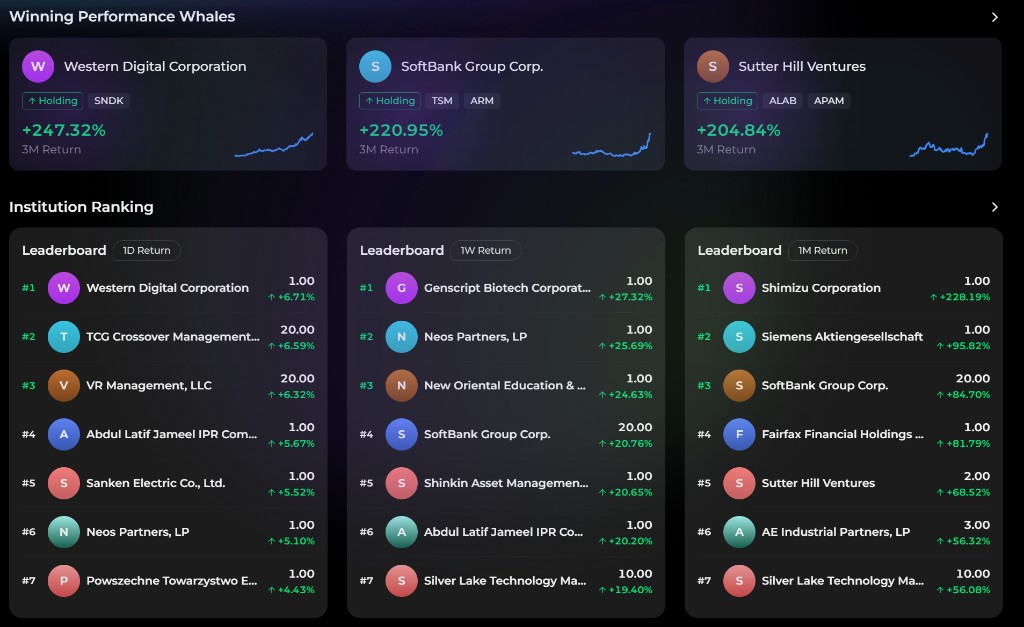
1. Find and add whales to your watchlist
Start by browsing the main tracker page.
Whales come in two kinds: institutions (such as ARK) and Congress members. Browse either, then open any profile for more detail. The product is built around turning public disclosures into a cleaner, easier-to-follow tracker experience.
When you open a whale detail page, you'll typically see:
- the whale's profile — for a Congress member, their party and committees; for an institution, its profile
- headline stats: Holdings MV, Total Holdings, and Last Updated
- total return and annualized return
- a Tracker Performance curve plotted against the S&P 500, updated as new disclosures are incorporated
For deeper analysis, subscribed accounts can also view detailed holdings and trade activity.
To add a whale to your personal tracker:
- Open the whale's detail page.
- Click the Follow (heart) button in the header.
- The whale is added to your tracked list, which you can review under the Whale tab in your watchlist.
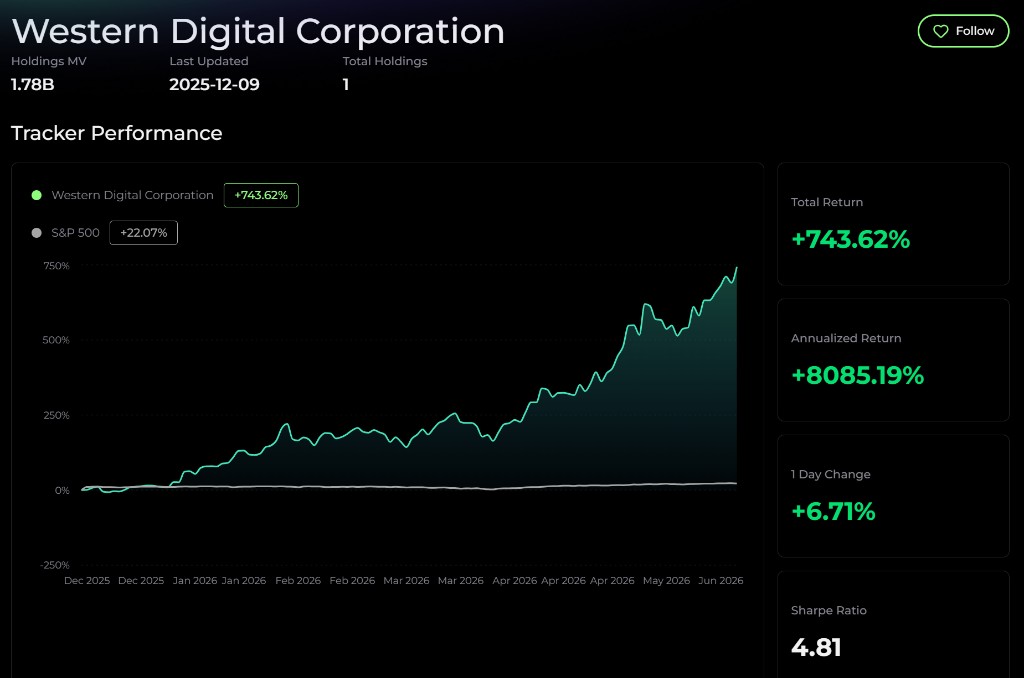
2. Monitor performance and trade updates
Once you have a whale on your list, the most useful next step is learning how to read its performance panel and portfolio updates.
Common metrics include:
| Metric | What it means |
|---|---|
| Total Return | Cumulative return since the tracker started following that whale |
| Annualized Return | A normalized growth rate used to compare longer-term performance |
| 1 Day Change | The tracker portfolio's most recent daily move |
| Sharpe Ratio | Risk-adjusted return efficiency |
| Tracker Performance curve | The simulated equity curve of the whale tracker plotted against the S&P 500 |
The ranking lists use their own windows — 1D / 1W / 1M / 1Y.
The detail page helps you answer two important questions:
- Has this whale actually outperformed over time?
- Is the return profile stable enough to be worth following?
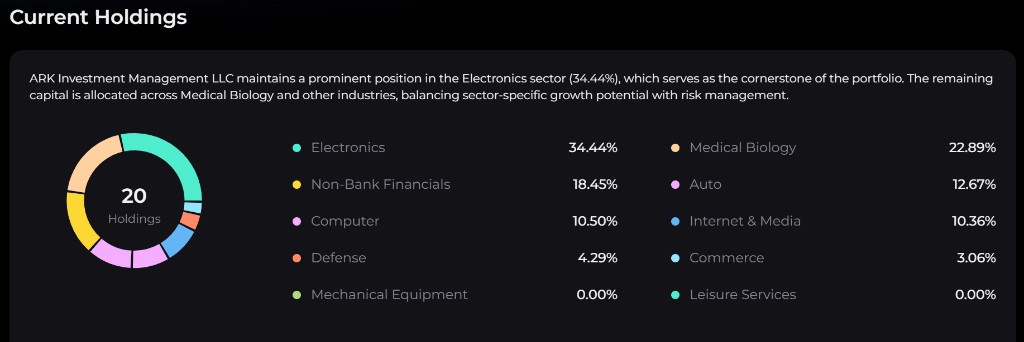
Where your account has access to deeper tracker content, you can also inspect:
- Current Holdings — symbol, P&L %, and Position Size, with sector weights alongside
- Trade Updates — a per-trade log showing the date, Buy / Sell action, ticker, Fill Price, and the position weight before and after the trade
3. Stay on top of whale moves and copy them
Following a whale adds it to the Whale tab of your watchlist, so you can jump back to its Trade Updates quickly. Alphio's notification settings currently have no separate whale-alert switch, so check Trade Updates for a whale's latest moves.
If you want a whale's moves executed for you, open its detail page and click Copy Trade in the header:
- Copy Trade for whales requires the Whale Auto Tracker add-on — your subscription tier does not matter (an Elite plan alone is not enough; Free plus the add-on is).
- Orders go to a connected US stock broker account (via SnapTrade or Robinhood). The minimum allocation is $100.
- Each whale is its own copy trade, so copying one institution does not affect copying another.
- Whale Copy Trade is being opened to accounts gradually. If your account can't start one yet, follow the holdings and Trade Updates manually.
See Copy trading for the full flow.
4. Market-level panels
The main Whales Auto Tracker page also includes broader market-level summary panels so you can see where whale activity is clustering:
- Institution Ranking - ranked institutional performance over 1D / 1W / 1M / 1Y
- Congress Ranking - the same ranked view for tracked Congress members
- Popular US Trade - US names with the biggest increase or decrease among tracked institutions, split into Increase and Decrease tabs
- Popular HK Trade - the same aggregation for Hong Kong stocks
- Winning Performance Whales - standout whales by 3-month return
These views are useful when you want to move beyond a single whale and understand what smart-money behavior looks like at a higher level.
5. Access and subscription
Whales Auto Tracker is sold as the Whale Auto Tracker strategy add-on, on a quarterly or annual subscription.
It is not bundled into any subscription tier, from Free through Enterprise — subscribing to a plan alone does not unlock it, and it can be purchased from any tier. It is also available as part of the "pick 3 strategies" annual bundle.
Browsing the tracker, rankings, and market-level panels is open. The deeper per-whale content — full Current Holdings and Trade Updates — is what the add-on unlocks; without it, those rows display an Unlock to view prompt, and the rankings hide each whale's top holdings. Check the Subscribe page for the live options on your account.
6. Final tips for success
To get the most from Whales Auto Tracker:
- Start with a few well-known whales before following too many at once.
- Track 3 to 5 whales with different styles instead of clustering around one type of investor.
- Compare their curves against the S&P 500 to understand whether the outperformance is meaningful.
- Remember that filing-based data can be delayed by regulation, especially for 13F-driven views.
- Treat whale tracking as one input, not a complete substitute for your own judgment.
Whales Auto Tracker is most useful when you use it as a disciplined smart-money reference layer rather than as blind imitation.
Data is delayed according to the underlying disclosure rules. Past performance does not guarantee future results. Nothing here is investment advice.
7. Frequently asked questions
What is Whales Auto Tracker?
Whales Auto Tracker is a smart-money tracking product that organizes institutional holdings, congressional trade disclosures, and related portfolio simulations into one view. It helps you monitor how large or influential market participants are positioned without having to manually parse every filing.
Is Whales Auto Tracker included in my current subscription?
No. It is a premium add-on bought separately from every subscription tier (Free through Enterprise), and users on any tier can subscribe to it. The Subscribe page inside Alphio shows the exact options available on your account.
Is there a free trial or refund for the Whales add-on?
No. The Whale Auto Tracker add-on does not offer a free trial, and it is non-refundable once purchased — all sales are final. Review the feature description and a few sample whale portfolios before subscribing.
How does Whales Auto Tracker select holdings for the portfolio?
It takes the top 20 holdings from an institution's 13F filings, weighted by their relative proportions, and normalizes them into a simulated portfolio. Positions beyond the top 20 are excluded to keep the tracker focused on the most impactful ones. Alphio reconstructs the portfolio from the filings rather than inventing a separate discretionary strategy.
How often is the portfolio updated?
Tracker portfolios are rebalanced weekly against the latest available filings, which are typically collected monthly. Bear in mind that 13F disclosures carry a 45-day lag — Q2 data, for example, only lands around mid-August — so the tracker can never be real-time.
Can I see the performance of the simulated portfolio?
Yes. Whale detail pages show total return, annualized return, Sharpe Ratio, and a Tracker Performance curve against the S&P 500, so you can evaluate how the tracked portfolio has behaved over time.
Is Whales Auto Tracker suitable for beginners?
Yes. It is especially helpful for beginners because it turns messy disclosure data into a more readable format with rankings, curves, and summarized holdings. You still need judgment, but the product makes the tracking process much easier.
How do I use Whales Auto Tracker effectively?
Start with a small watchlist, follow the strongest or most relevant whales, monitor their performance and portfolio changes, and check their Trade Updates regularly. Review curves and holdings periodically instead of reacting to every single data point.
How can I copy and track the portfolio manually?
You can manually track a whale by following it, reviewing its current holdings, and comparing rebalance-style updates over time. If you want to mirror exposure yourself, use the holdings and trade updates as a reference and place the trades in your own broker account according to your own sizing and risk rules. With the add-on, you can instead click Copy Trade on the whale's detail page to have its moves executed in your connected broker account (see section 3).
This page is available as plain Markdown at https://alphio.ai/docs/discover/whales-auto-tracker-tutorial.md. An index of every page, with a one-line summary each, is at https://alphio.ai/docs/llms.txt.