Usage
Track your Credits balance by pool, when each bucket expires, how many Credits you use per day, and this month's Credits activity.
Find it at: web — /account/billing (avatar menu → Billing & Usage; the old /account/usage link redirects there); mobile web — /account/usage; app — Profile → Usage.
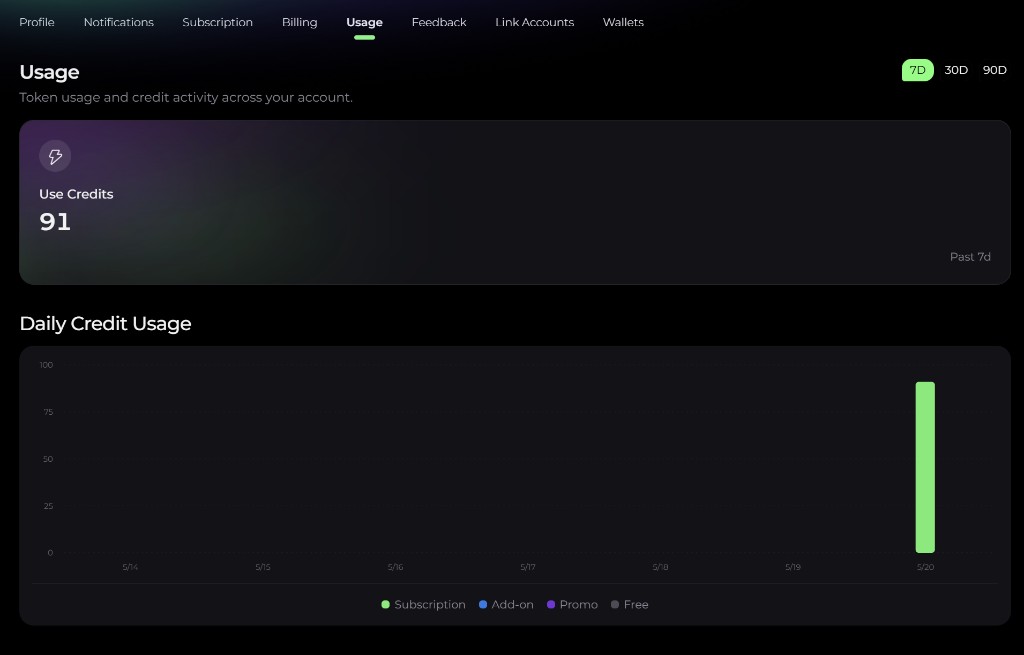
1. Credits balance breakdown
Your balance is split into the Credit pools described in Credits system. The labels differ slightly by screen:
| Pool | Billing & Usage (web) | Usage page (mobile web / app) | Expiration |
|---|---|---|---|
| Monthly Credits | Plan | Subscription | Reset on each billing cycle; lost if unused. The next reset date is shown. |
| Recharge Credits | Purchased | Add-on | 1 year from purchase; roll over between cycles until then |
| Limited-time Credits | Bonus | Promo | On the date set when granted |
| Free Credits | Free | Free | One-time sign-up allowance; shown only while you're on the Free tier |
On the mobile web and app Usage page, a Credit Buckets list shows each Recharge and Limited-time bucket individually with its own expiry date — buying $20 today and $50 next week produces two Recharge buckets, each expiring 1 year after its own purchase.
2. Credits activity
The ledger shows this month's Credits movements in two columns:
- Earn Credits — grants, such as your subscription grant, a top-up, a Daily Check-in, or a promo reward.
- Use Credits — spending, such as Chat, Trade Agent, or a backtest.
Each row shows what the movement was and the amount. On the web it appears as Credits activity on the Billing & Usage page; on mobile web and in the app it's My Credits on the Usage page, 10 rows per page.
3. Daily usage
- Web — the Usage card shows Credits spent over the last 7D / 30D / 90D, plus your average per day.
- Mobile web / app — the Daily Credit Usage chart shows daily bars for the same windows, stacked by pool (Subscription, Add-on, Promo, Free), with totals for Use Credits and Agent Steps in the selected window.
4. Reading the deduction order
When you spend Credits, Alphio deducts from your pools in a fixed order:
Limited-time → Monthly → Recharge → Free
The intent is simple — burn the soonest-expiring Credits first, then your regular monthly grant, and keep Recharge (valid for 1 year from purchase) as your reserve. The Free allowance is only used on the Free tier.
Practical implications:
- If you have a promo grant ending Sunday, it gets spent before your Monthly Credits.
- Your Monthly Credits get spent before any Custom Credits you bought.
- Recharge Credits only get drawn down once both Limited-time and Monthly are exhausted.
5. Topping up
When you run low, open the Top-Up Credits page to buy more Recharge Credits. See Custom credits for details.
After a top-up:
- The new Recharge Credits appear in your balance once the payment is confirmed.
- The activity list gets a new Top-up entry under Earn Credits.
This page is available as plain Markdown at https://alphio.ai/docs/account/usage.md. An index of every page, with a one-line summary each, is at https://alphio.ai/docs/llms.txt.