Notifications Settings
Control which notifications Alphio sends, and through which channels (in-app, Telegram).
Find it at: web — avatar menu → Setting → Notifications; mobile web — /account/setting/notifications (Account tab → Notifications); app — Profile → Notifications. The gear icon in the Message Center opens the same settings.
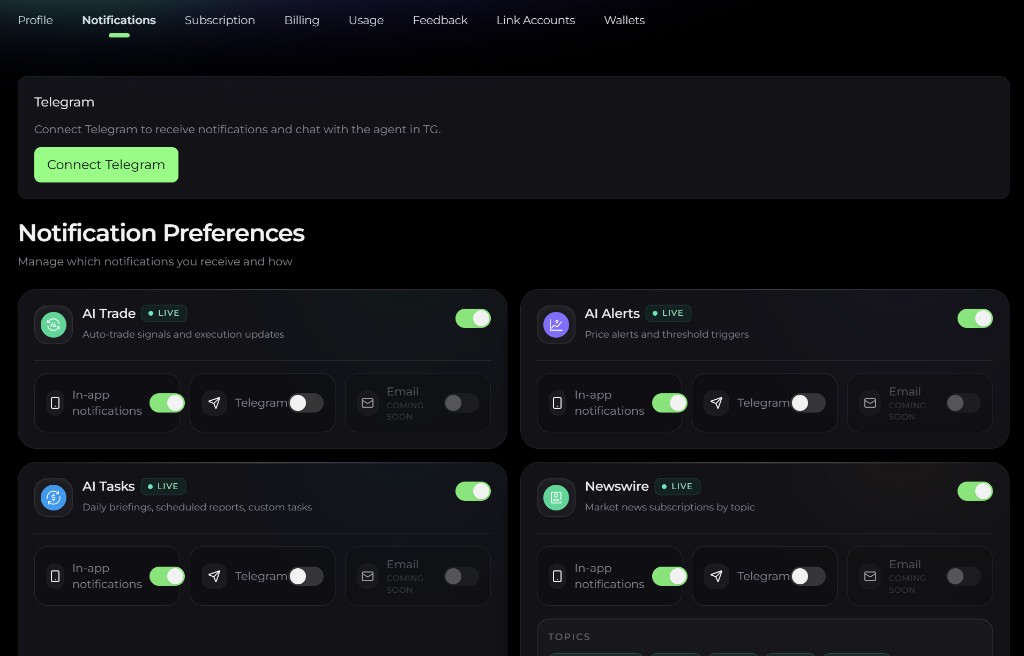
1. The 6 categories
Alphio groups notifications into 6 categories. Each category has its own on/off switch and its own per-channel switches.
| Category | What it covers |
|---|---|
| AI Trade | Signals and fills — trade fills, position changes, order rejections across Stock Trading, Hyperliquid Perpetuals, and Prediction Markets. |
| AI Alerts | Price and threshold alerts. |
| AI Tasks | Briefings and reports — async Alphio AI task results such as research runs, scheduled analyses, and Monitor Brief. |
| Square | Replies, mentions, follows, and other activity in Square. |
| Newswire | Market headlines, breaking events, and Daily / Weekly Market Brief delivery. |
| Promotions | Product and research announcements, new feature launches, limited-time offers, and survey invitations. |
The former AI Companion category has been retired and no longer has a switch.
AI Alerts is switchable today, but the alert engine that produces these notifications is still being built — so leaving it on won't currently deliver much.
2. Channels per category
Turn a category off entirely with its switch, or leave it on and pick channels. Two channels are available:
| Channel | Notes |
|---|---|
| In-app | Delivered to the in-app notification center and, on mobile, as a push notification. Requires OS-level push permission for mobile push. |
| Telegram | Requires Telegram to be bound — see section 5. |
Both channels are toggled per category, so you can (for example) route AI Trade to Telegram while keeping Newswire in-app only. Turning a category off suppresses every channel for that category.
3. Square sub-settings
Expand Square to choose which community activity notifies you. These switches control both in-app alerts and push:
- Likes
- Replies
- New followers
- Agent replies
- Trades from people you follow (off by default)
4. Newswire topics
Newswire has an extra layer: once the category is enabled, you can narrow it to the topics you care about:
- Cryptocurrency
- Stocks
- Macro
- Assets
- Corporate
Only the topics you select are delivered.
5. Telegram delivery
Telegram is a separate channel that requires a one-time bind. Once bound, any category you've enabled for Telegram is mirrored to your Telegram chat with the Alphio bot.
See Connect Telegram for the bind / unbind flow and binding states. After binding, each category can be individually toggled for Telegram on this settings page.
This page is available as plain Markdown at https://alphio.ai/docs/account/notifications-settings.md. An index of every page, with a one-line summary each, is at https://alphio.ai/docs/llms.txt.