Signals Overview and Tiers Tutorial
Alphio offers multiple signal products across US stocks and crypto. This guide helps you understand how they differ, which workflow each one is built for, and how to choose the product that fits the way you trade.
Find them on the home page (Dashboard, web and app): the Copy Stock Signal row holds AI Stock Pick, Daytrading Center, Swing Max, QuantAI Alpha Pick, ARKK Grid Trade (web only), SwingMax Portfolio, Event Signal, and Whales Tracker; the Copy Crypto Signal row holds Hyperliquid Vault, Crypto Radar, and Coin Swing. Each product also has its own page, linked in the tutorials below (for example /swingmax-signal, /crypto-radar).
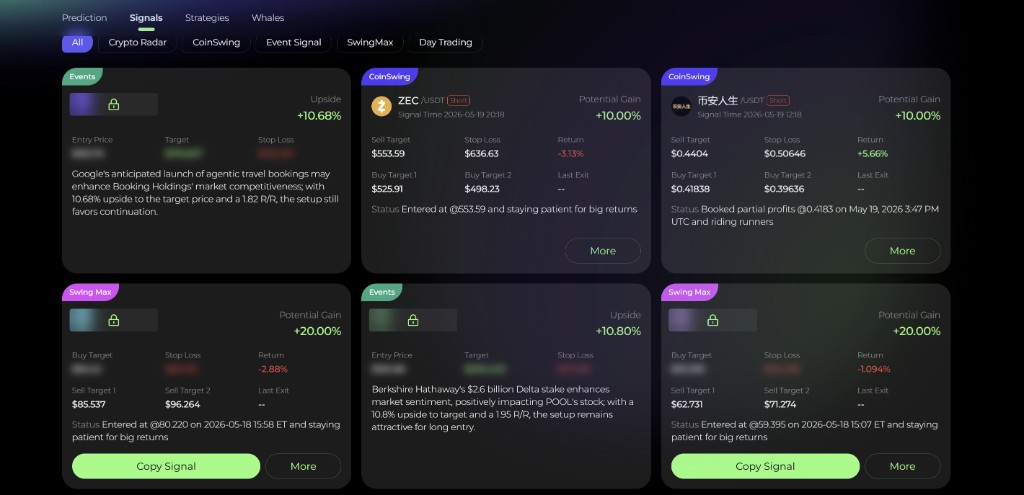
1. Product comparison
Each Signals product is designed for a different market, time horizon, and decision style.
| Product | Asset class | Trade style | Update cadence | Best for |
|---|---|---|---|---|
| SwingMax Signal | US stocks | Multi-day swing | Continuous when high-conviction setups appear | Traders who want individual swing entries with defined targets and stops |
| SwingMax Portfolio | US stocks | Curated swing portfolio | Rebalances as portfolio holdings change | Users who want a small AI-managed swing basket instead of picking signals one by one |
| CoinSwing Signal | Crypto | Multi-day swing | Continuous when qualified setups appear | Crypto traders who want staged long / short swing opportunities |
| DayTrading Signal | US stocks | Intraday | During active market hours | Traders looking for same-session buy / sell setups |
| AI Stock Picker | US stocks | Weekly top-10 stock rotation | Refreshed weekly for Monday rebalance | Users who want an equal-weight weekly basket rather than continuous signals |
| Crypto Radar | Crypto | Event + technical | Real-time during active trading | Fast-moving perpetual traders who need structured signal cards and market context |
| Quant AI Alpha Pick | US stocks | Quant portfolio | Updates as the strategy rebalances | Mid-term investors who prefer AI-built portfolio rotation |
| Event Signal | US stocks | Event-driven | Updates when meaningful catalysts produce structured setups | Traders who want catalyst-based ideas with clearer entry, target, and stop structure |
| ARK Grid Trade | US stocks | Grid orders driven by ARK Invest disclosures | Daily, after ARK publishes its trades | Users who want ARK's buy / sell bias executed as staged limit orders in their own broker account |
2. How signals differ in practice
Although these products all belong to Alphio's signal family, they are not interchangeable.
The main differences are:
- time horizon - intraday, daily, multi-day swing, or longer rebalance cycles
- decision unit - single signal cards versus full portfolio products
- execution style - manual follow-through, one-click trade routing, or portfolio-style copy trading
- market exposure - long-only, long/short, or event-driven scanners
For example:
- DayTrading Signal and Crypto Radar are more useful when you want short-lived opportunities and tighter same-session execution.
- SwingMax Signal and CoinSwing Signal are better when you want clearer multi-day swing setups.
- SwingMax Portfolio and Quant AI Alpha Pick reduce decision load by packaging multiple positions into one AI-managed framework.
3. How to choose the right one
If you're not sure where to start, use this simple decision path:
- If you want US stock swing trades one by one, start with SwingMax Signal Tutorial.
- If you want a small curated stock portfolio, start with SwingMax Portfolio Tutorial.
- If you want crypto swing setups, use CoinSwing Signal Tutorial.
- If you want intraday US stock signals, use DayTrading Signal Tutorial.
- If you want a weekly top-10 stock rotation basket, use AI Stock Picker Tutorial.
- If you want real-time crypto scanner signals, use Crypto Radar Tutorial.
- If you want a mid-term AI-managed stock portfolio, use Quant AI Alpha Pick Tutorial.
- If you want event-driven stock setups, use Event Signal Tutorial.
4. Subscription and access
Viewing a signal feed and copy-trading it are two separate gates. Most signals are bundled into a subscription tier; a few strategies are sold only as standalone add-ons.
| Product | View the signals | Copy Trade (auto-execute in your account) |
|---|---|---|
| CopyTrade Vault | All tiers, including Free | — |
| CoinSwing Signal | Basic and above | Plus and above (Hyperliquid perpetuals) |
| Crypto Radar | Plus and above | Not available — follow the setups manually |
| AI Stock Picker | Plus and above, or the standalone AI Stock Picker add-on | Plus and above (being rolled out gradually — the button may not show on every account yet) |
| Stock Event Signal | Plus and above | Plus and above |
| SwingMax Signal | Plus and above | Plus and above |
| DayTrading Signal | Pro and above (not included in Plus) | Pro and above |
| Crypto Event Signal | Elite and above | — |
| ARK Grid Trade | Signals: any signed-in user | Creating a grid strategy: Pro and above |
| SwingMax Portfolio, Quant AI Alpha Pick, Whale Auto Tracker | Add-on only — not included in any tier | Requires that strategy's own add-on (no tier needed) |
What free users see:
- Each signal feed shows one free sample — the first card on the first page keeps its real ticker; the rest are masked until you upgrade.
- Closed Event Signal cards always show the real ticker, because they are historical results.
Stock Copy Trade runs through a connected US stock broker account (via SnapTrade or Robinhood). CoinSwing Copy Trade places leveraged perpetual orders on Hyperliquid with your own funds.
For the full plan comparison, see Subscription tiers. The authoritative source for what your account can access is always the in-app subscription page (/account/subscription).
If you are deciding between products, it is usually better to first pick the workflow that matches your trading style, then confirm the tier or add-on you need.
5. Final thoughts
The goal of Alphio's signal lineup is not to give every user the same feed, but to offer different ways to act depending on how you trade.
Choosing the right product is mostly about matching:
- your time horizon
- the market you trade
- whether you prefer single setups or portfolio-style guidance
Once that matches, the tutorials linked above are the easiest next step.
This page is available as plain Markdown at https://alphio.ai/docs/discover/signals-overview-and-tiers-tutorial.md. An index of every page, with a one-line summary each, is at https://alphio.ai/docs/llms.txt.