Chat cards
Alphio AI answers can include structured cards — charts, financial snapshots, analyst ratings, valuations, predictions, screeners, holdings, and order previews — so the key numbers are readable at a glance instead of buried in prose.
Try the demo below:
Find it at: inline in any Alphio AI reply on the Agent page or in an asset page's AI Analysis panel. No separate URL.
1. Research cards
Alphio AI adds a card when structured data answers the question better than text.
| Card | Typical prompt | What it shows |
|---|---|---|
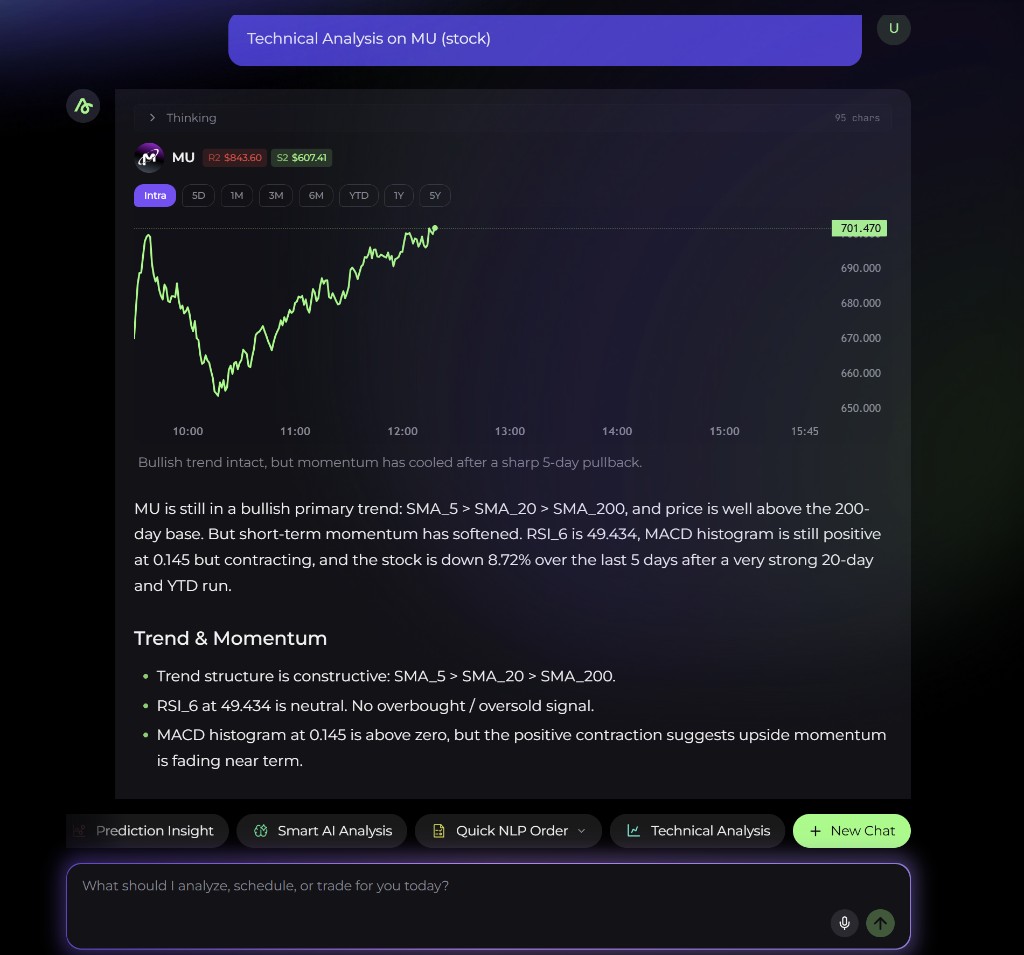
| K-line | "Show me NVDA's chart" | Interactive price chart for the asset, with support, resistance, and pivot levels when Alphio AI provides them |
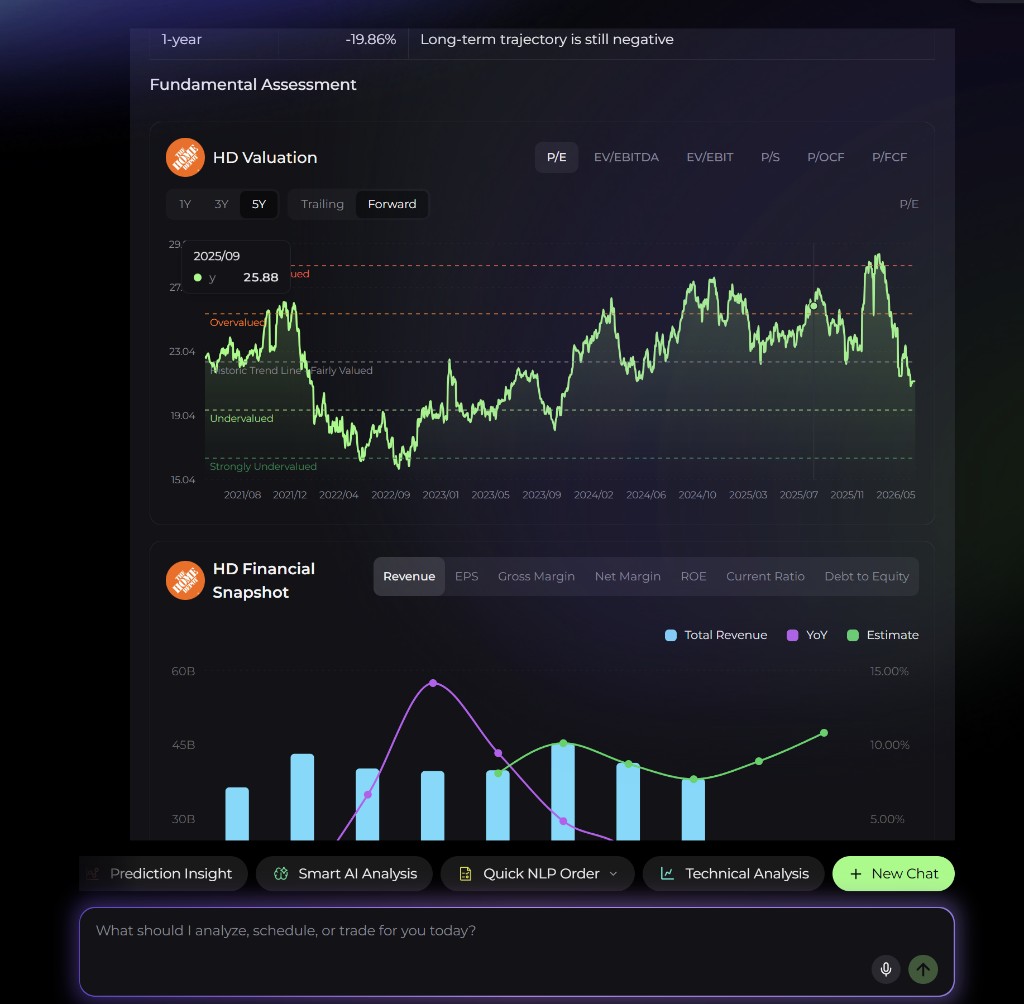
| Financial snapshot | "How healthy are AAPL's financials?" | Revenue, gross margin, net margin, current ratio, and debt-to-equity |
| Should I Buy | "Should I buy AAPL?" | Two options-market sentiment gauges based on put-call ratios, each labelled Bullish, Neutral, or Bearish |
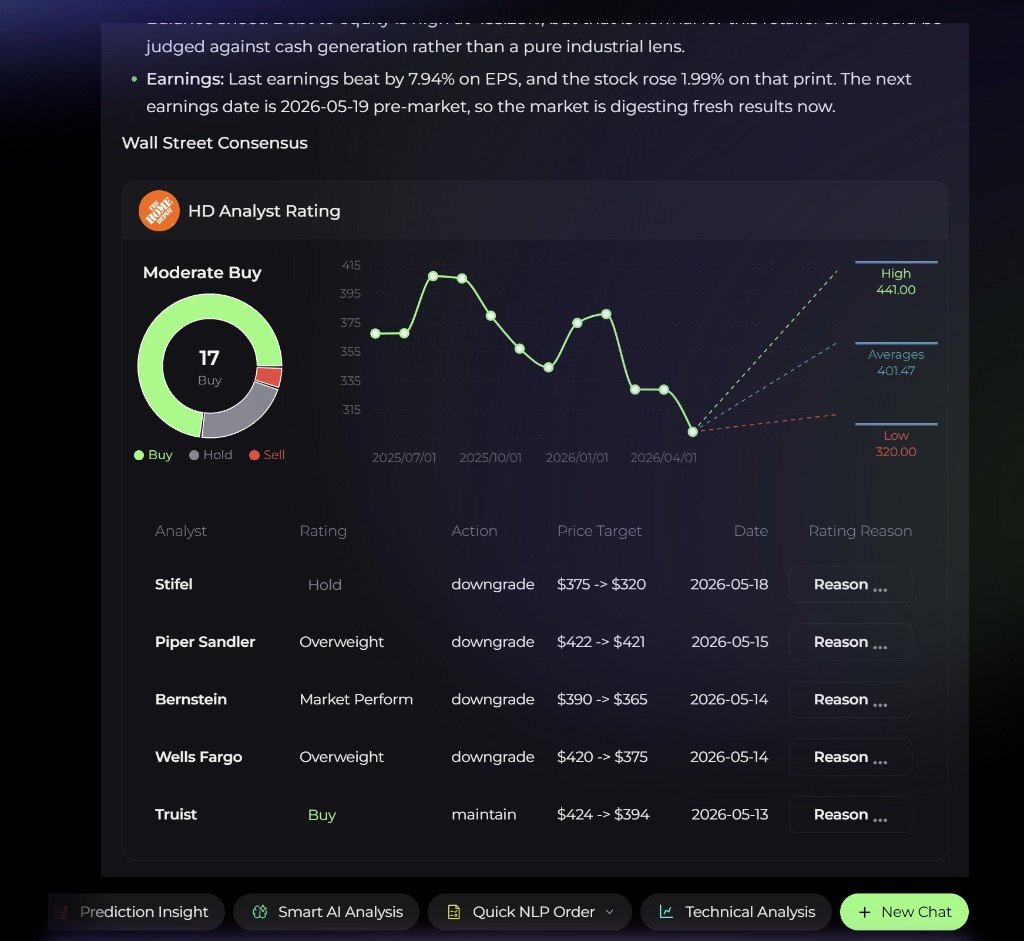
| Analyst Rating | "What do analysts think of TSLA?" | Consensus rating, the Buy / Hold / Sell split, high / average / low price targets, and recent analyst actions with their reasons |
| Valuation | "Is META overvalued?" | Trailing and forward valuation against the stock's historic trend line — from Strongly Undervalued to Strongly Overvalued |
| Price Prediction | "Where is SOL headed?" | Forecast chart with predicted daily high, daily low, sentiment, and confidence |
| Stock Picking | "Find me oversold semiconductor names" | Ranked list with industry, margin, RSI, and recent price-change columns; expand to see every row |
| AI Screener | "Which stocks look bullish for next week?" | Bullish or bearish candidates for tomorrow, next week, or next month, with predicted return, probability, and similarity |
| Options strategy | "Suggest an options strategy for NVDA" | One concrete options strategy for a US stock or ETF — legs, strikes, and a payoff curve with breakeven, max profit, and max loss |
| Holdings snapshot | "Show my holdings" | Positions in your connected account — symbol, units, price, open P&L, average purchase price, previous close |
The Options strategy card is analysis only — it does not place options orders.
2. Trading and task cards
When you ask Alphio AI to trade or to watch something for you, the answer is a card that sets up a task.
| Card | When it appears | What you do with it |
|---|---|---|
| Order preview (Trade plan, Batch Order Preview) | "Buy 10 AAPL now", "Long ETH 2x with a stop at 3,000" | Review — and if needed edit — asset, side, size, price, and leverage, then confirm with Execute Plan or Slide to Confirm |
| Monitor Order Preview | An order that waits for a price or indicator condition | Same review and confirm step; the order is placed when the condition is met |
| Event Order Preview | An order that waits for an event (earnings, macro data, news) | Same review and confirm step |
| Cyclical Order Preview | A recurring order ("Buy $100 of BTC every Monday") | Same review and confirm step; orders are placed on schedule |
| Account required | You asked to trade without a connected account | Connect a broker, an exchange, or a wallet from the card, then ask again |
| Task card | An alert or a scheduled task | Shows the task and its status (Pending, Running, Done, Failed); View in General tasks opens it in your task list |
Nothing is traded until you confirm an order card. By confirming, you authorize the whole task: when it runs, the resulting orders are placed without a separate confirmation. Track or stop it from Agent tasks.
3. Limit cards
If an answer can't continue because of your plan or balance, a card replaces the rest of the reply:
| Card | Meaning | Button |
|---|---|---|
| Out of credits | Your Credit balance ran out mid-answer | Opens the Credits top-up page |
| Daily Limit Reached | You've used the Free plan's chats for today | Opens your subscription page |
| Monthly task limit reached | You've used the Free plan's task creations for this month | Opens your subscription page |
The daily and monthly limit cards show how much you've used. Topping up Credits doesn't lift a daily or monthly limit — upgrading does, or you can wait for the reset.
4. Streaming
- Progress while it works. While Alphio AI plans the answer and fetches data, it shows what it's doing above the reply.
- Card skeleton. While data is loading, a card renders as a skeleton and fills in when the data arrives.
- Stop. You can stop a reply mid-stream from the input row; whatever has already rendered stays visible.
5. Sources and links
- Source chips. When Alphio AI uses a web page or news article, it appears as a small chip with the site's icon. Click it to open the source in a new tab; a chip with +N groups several sources.
- Source list. Some answers end with an N sources pill — expand it to see each source and open it.
- Ticker links. Tickers in the answer link to that asset's detail page.
- Follow-up questions. Suggested follow-ups appear under some replies; clicking one fills the input box so you can edit it before sending.
This page is available as plain Markdown at https://alphio.ai/docs/chat/chat-cards.md. An index of every page, with a one-line summary each, is at https://alphio.ai/docs/llms.txt.