CoinSwing Signal Tutorial
CoinSwing Signal helps you approach crypto swing trading with clearer entries, staged exits, and more structured risk control.
Try the demo below:
Find it at: /coinswing-signal — or, on the home page (Dashboard), click the Coin Swing card in the Copy Crypto Signal row (web and app).
Viewing the signals: Basic and above. Copy Trade (auto-execute on Hyperliquid): Plus and above. See Subscription tiers.
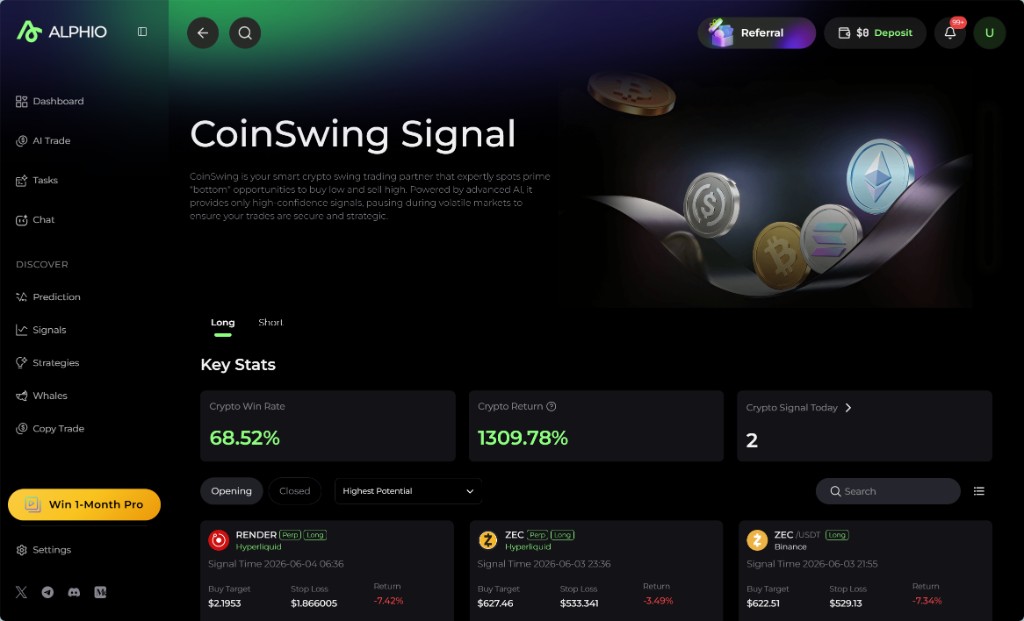
1. Swing trading has never been easier
Swing trading is popular among active traders who want to capture short-term moves without watching the market every minute. CoinSwing Signal is Alphio's AI-driven crypto swing-trading product, built to help you make more confident decisions with less guesswork.
Instead of manually scanning dozens of tokens and charts, you get a focused stream of setups with entries, targets, stop loss, and ongoing trade guidance in one place.
2. How CoinSwing Signal works
CoinSwing Signal uses AI models and market-structure analysis to identify promising long and short opportunities across major crypto assets.
The product is designed to improve entry timing:
- For long trades, it looks for setups where price is near a relative low and the odds of a swing higher are attractive.
- For short trades, it looks for setups where price is near a potential local top and downside momentum is more favorable.
Long strategies generally work better when the broader market is trending upward, while short strategies tend to become more effective during weaker or falling conditions. CoinSwing Signal helps you stay aligned with changing market direction instead of forcing the same style in every regime.
For exits, each signal can include up to two staged take-profit levels, so you can lock in gains progressively rather than relying on a single all-or-nothing exit.
3. Risk management
Risk control sits at the center of CoinSwing Signal.
Each trade includes a stop-loss level that is set by the signal itself. You can still adjust your own execution and position sizing based on your personal risk tolerance.
The main goal is simple: even when the market moves against the signal, the trade plan already includes a clear downside boundary.
4. Key features
Top-of-page metrics
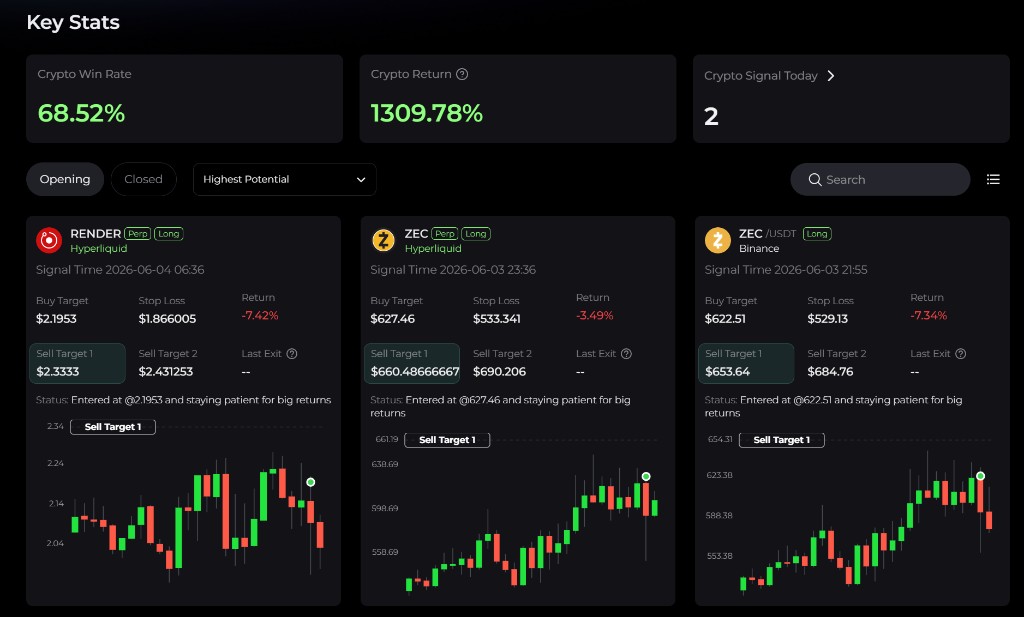
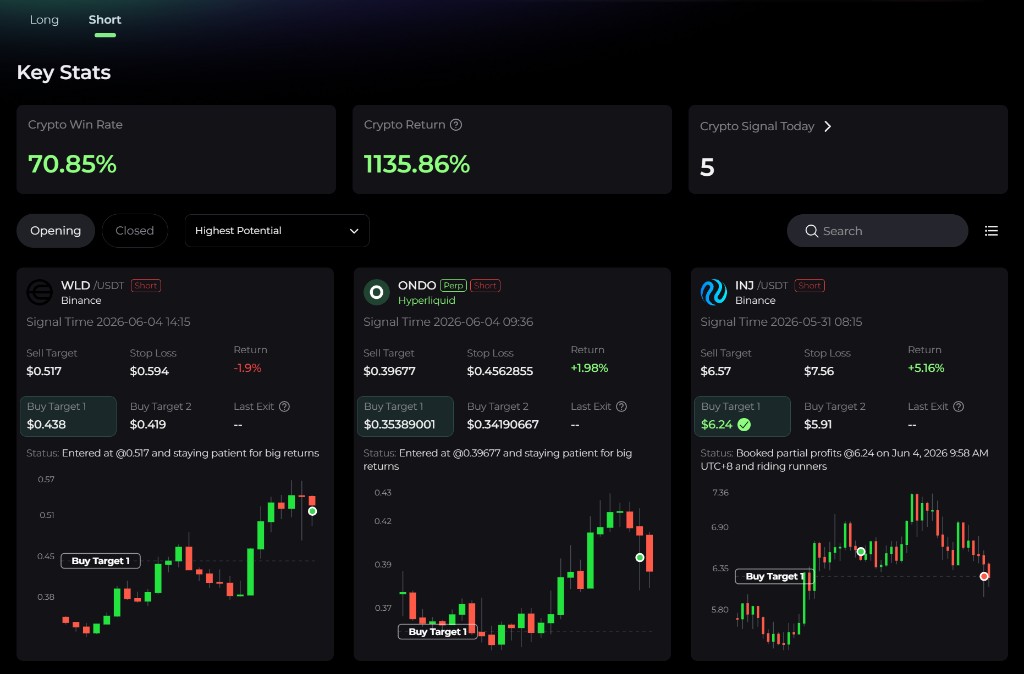
At the top of the CoinSwing dashboard, you'll see three quick-read metrics:
| Metric | What it shows |
|---|---|
| Crypto Win Rate | Percentage of profitable completed trades |
| Crypto Return | Annualized return based on backtested or rolling strategy results |
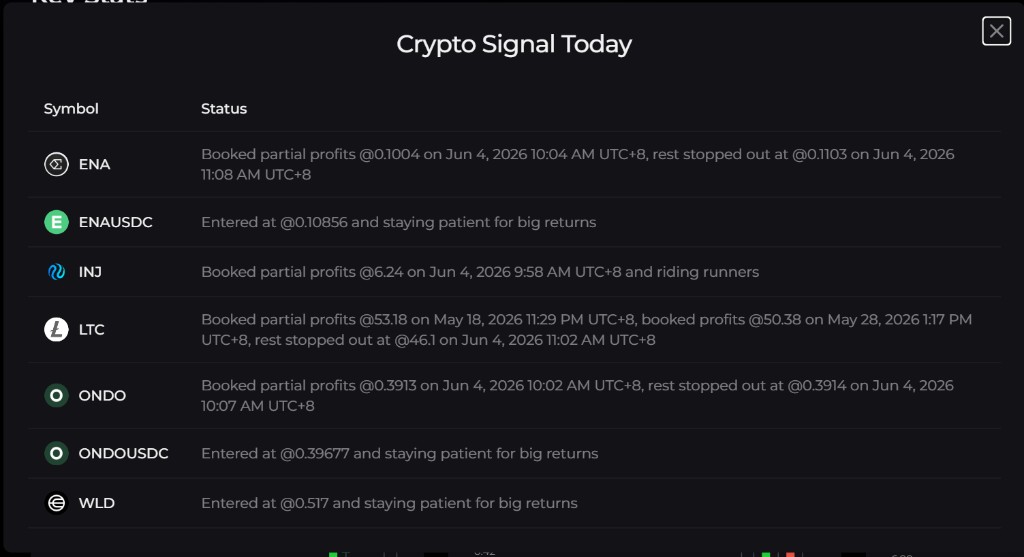
| Crypto Signal Today | Number of new entry and exit-related updates generated that day |
The page also lets you switch between Long and Short views so you can inspect setups that match the current market tone.
Signal states
Each signal falls into one of two broad buckets:
- Opening - assets with an active entry signal and an open trade idea
- Closed - assets where the exit logic has completed and the trade cycle is finished
This separation makes it easier to distinguish between trades you may still act on and trades you should review as finished examples.
Opening list
The Opening list shows all assets with an active CoinSwing setup. For each one, you can typically review:
- Buy / Sell Target - the price area where the entry signal was triggered
- Stop Loss - the recommended loss limit
- Target 1 and Target 2 - staged profit-taking levels
- Return - your floating gain or loss if entered at the signal
- Tag - whether the setup is long or short
- Last Exit - the latest guided exit level when the trade has already advanced through part of the plan
- Status - the current guidance for how the signal is progressing
When price breaks Target 2, the usual guidance is to trail your stop upward and continue holding the remaining position while momentum stays favorable.
Status guidance
For each open trade, the Status column shows how the signal is progressing. One common way to act on it (an example approach, not a rule enforced by the product):
- When the status first suggests partial profit-taking, consider selling around 30% of the position and moving the stop loss up to Target 1.
- If price continues in your favor and the signal suggests another round of profit-taking, consider selling another 30% and raising the stop to Target 2.
- For the remaining 40%, you can use a trailing stop, such as 3% below the highest price reached, as long as price remains above Target 2.
This type of staged exit helps you protect gains while still keeping some upside exposure.
Sorting and review
You can sort open signals by Highest Potential, Highest Return, Latest Signals, or Oldest Signals, and closed signals by Highest Max Gain, Highest Return, Latest Signals, or Oldest Signals.
Closed signals let you inspect:
- entry price and date
- exit price and date
- Target 1 and Target 2 fill history
- realized return
- a timeline showing when profits were booked or when stop loss was triggered
That makes the product useful not only for live execution, but also for reviewing how the system behaves over time.
Copy Trade (auto-execute on Hyperliquid)
If you would rather not place every CoinSwing trade yourself, click Copy Trade in the page header. Copy Trade has a stricter gate than the signal feed: it requires Plus and above.
- Orders are placed as leveraged perpetuals on Hyperliquid, using your own funds in your Hyperliquid perps account. Entries are skipped when the balance is insufficient.
- Choose how much margin each entry uses: a Fixed amount per trade or a Percentage of balance.
- Choose the Leverage. Higher leverage means a smaller adverse move can wipe out the position. A protective stop-loss is placed for you, but it is not guaranteed to fill.
- Changes to the settings apply to future entries only.
Once a copy trade is running, the button shows Copied; click it again to manage or stop it. See Copy trading.
5. Best practices for maximizing success
To get the most from CoinSwing Signal:
- Check new signals regularly - fresh setups appear when market conditions are favorable, not on a fixed clock.
- Let the product narrow the field - CoinSwing saves research time by surfacing only stronger swing setups instead of overwhelming you with noise.
- Stay aware of macro conditions - major market events can still dominate technical setups, especially in crypto.
- Do your own due diligence - AI can help with timing and structure, but it cannot eliminate unexpected risks.
- Use staged exits consistently - partial profit-taking and stop adjustments are part of what makes the process more disciplined.
6. Important disclaimer: know the risks
There are several limits every user should keep in mind:
- Past performance does not guarantee future results. Even strong historical performance does not ensure the same outcome going forward.
- AI is not perfect. CoinSwing Signal is based on technical and market data, but models can still be wrong.
- Major events can override the setup. Sharp market-wide selloffs, exchange incidents, token-specific news, or liquidity shocks can all affect signal quality and execution outcomes.
CoinSwing Signal is designed to support decision-making, not replace your judgment.
7. Final thoughts
CoinSwing Signal is built to make crypto swing trading more structured, efficient, and easier to follow.
By combining AI-generated entries, staged profit targets, stop-loss guidance, and ongoing signal status, it helps reduce hesitation and simplify day-to-day decision-making.
Alphio improves the process, but you are still the final decision-maker. Stay informed, respect market conditions, and use CoinSwing Signal as a disciplined framework for navigating crypto swings.
This page is available as plain Markdown at https://alphio.ai/docs/discover/coinswing-signal-tutorial.md. An index of every page, with a one-line summary each, is at https://alphio.ai/docs/llms.txt.