Whales Auto Tracker
Whales Auto Tracker turns institutional 13F holdings and U.S. congressional trade disclosures into ranked, simulated portfolios you can follow in one dashboard.
Find it at: /whales-auto-tracker — or click the Whales Tracker card in the Copy Stock Signal row on the home page (Dashboard). You can also search for an institution or Congress member from the top search bar.
For a step-by-step walkthrough, see the Whales Auto Tracker tutorial.
1. Landing page
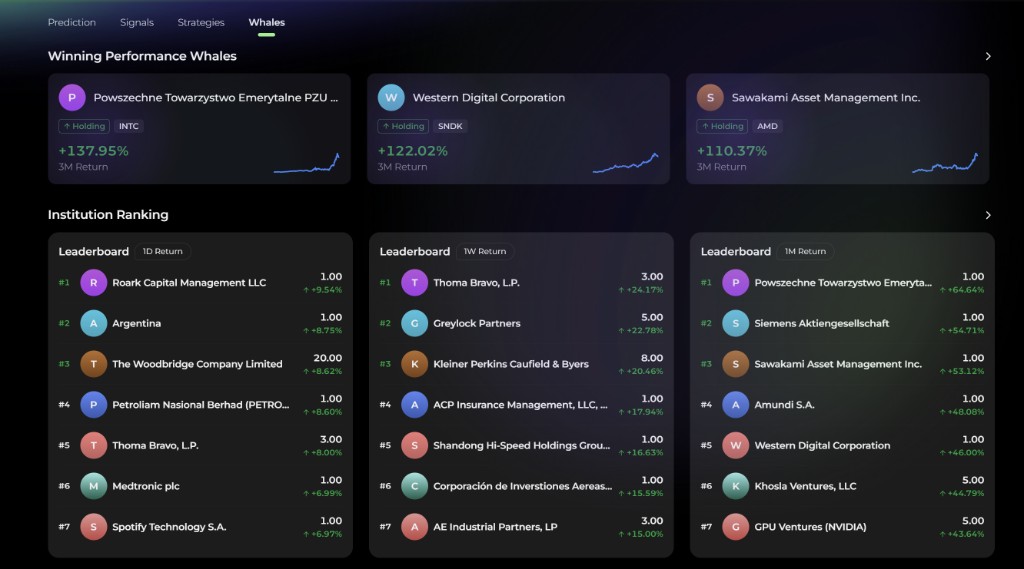
The main page is organized top to bottom:
| Section | What it shows |
|---|---|
| Featured | A carousel of highlighted whales. |
| Institution Ranking / Congress Ranking | Ranked institutions and Congress members, with a 1D / 1W / 1M / 1Y period switch (default 1D). |
| Popular US Trade / Popular HK Trade | Names with the biggest holding increases or decreases among tracked institutions, split into Increase and Decrease tabs, with 3-month share change and holdings market value. |
| Winning Performance Whales | Standout whales ranked by 3-month return. |
| FAQ | Answers about how the tracker portfolios are built. |
2. Whale detail page
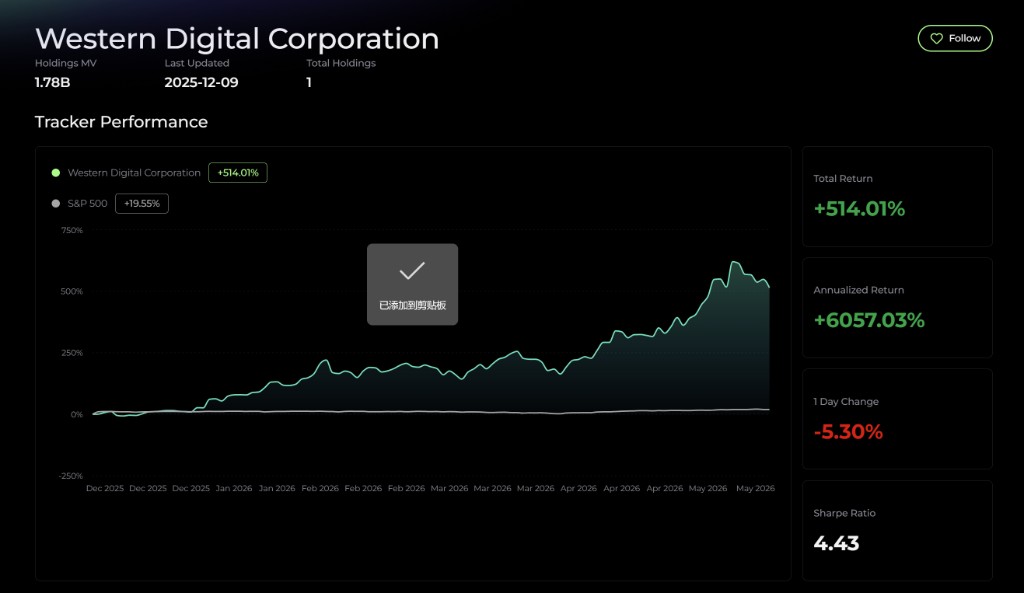
Institutions and Congress members share the same detail layout:
- Header — name, profile (for a Congress member, their organization, committees, and party), and headline stats: Holdings MV, Last Updated, and Total Holdings. The header also has the Follow button and, where available, Copy Trade.
- Tracker Performance — the simulated portfolio's curve against the S&P 500, with Total Return, Annualized Return, 1 Day Change, and Sharpe Ratio.
- Trade Updates — a per-trade log with date, Buy / Sell, ticker, Fill Price, and weight before and after the trade.
- Current Holdings — symbol, P&L %, and Position Size, with a sector breakdown.
- Investing Philosophy and a disclaimer, followed by an FAQ.
Without the Whale Auto Tracker add-on, tickers in Trade Updates and Current Holdings show Unlock to view, and the rankings hide each whale's top holdings.
3. Follow a whale
- Open any institution or Congress-member detail page.
- Click Follow (heart icon) in the header.
- The whale appears under the Whale tab of your watchlist.
Following a whale does not turn on a separate whale alert — Alphio's notification settings currently have no whale-alert switch. Check the whale's Trade Updates, or ask Alphio AI in chat for its latest moves.
4. Copy a whale
With the Whale Auto Tracker add-on, click Copy Trade on a whale's detail page to mirror its moves into a connected US stock broker account (SnapTrade or Robinhood). Your subscription tier does not matter — only the add-on does. Each whale is a separate copy trade. Whale Copy Trade is being opened to accounts gradually, so it may not be available on every account yet. See Copy trading.
5. Access
Whale Auto Tracker is a standalone add-on (quarterly or annual) and is not included in any subscription tier, from Free through Enterprise. See Subscription tiers.
6. Data sources and delays
Whales data comes from public regulatory disclosures and carries the lag built into each filing type:
- Institutions — 13F filings, which can arrive up to 45 days after quarter end. Each tracker portfolio uses the institution's top 20 13F holdings.
- Congress members — STOCK Act trade disclosures, which are filed after the trade date.
Because of these delays, the tracker is never real-time. Past performance does not guarantee future results.
This page is available as plain Markdown at https://alphio.ai/docs/research/whales-auto-tracker.md. An index of every page, with a one-line summary each, is at https://alphio.ai/docs/llms.txt.