Crypto Radar Tutorial
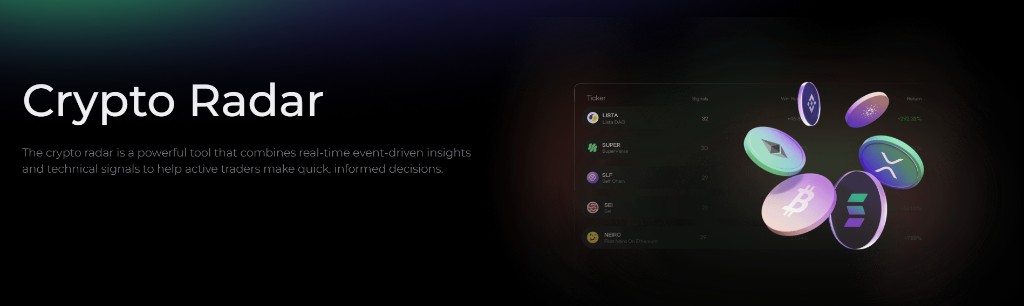
Crypto Radar is Alphio's AI-powered trading assistant for crypto perpetuals. It combines real-time market signals, structured trade setups, and leverage guidance so you can trade with more speed and structure without staying glued to the charts.
Try the demo below:
Find it at: /crypto-radar — or, on the home page (Dashboard), click the Crypto Radar card in the Copy Crypto Signal row (web and app).
Available on Plus and above. Without it, the first card in the feed is a free sample and the rest are masked. See Subscription tiers.
0. Why it was built
Crypto Radar is built for traders looking for high-return opportunities over short windows, typically around 1 to 3 days, and who are comfortable taking on more risk in exchange for faster-moving setups.
Short-term crypto markets can create outsized opportunities, but they also demand:
- accurate timing
- strict risk control
- fast execution
Many traders struggle with the same three problems:
- entering at the right time
- cutting losses quickly
- taking profits before reversals
Crypto Radar helps by surfacing a pre-structured plan: where to enter, where risk should be capped, where profits can be taken, and what leverage range may be appropriate based on confidence and volatility filters.
1. Key Stats: your market snapshot
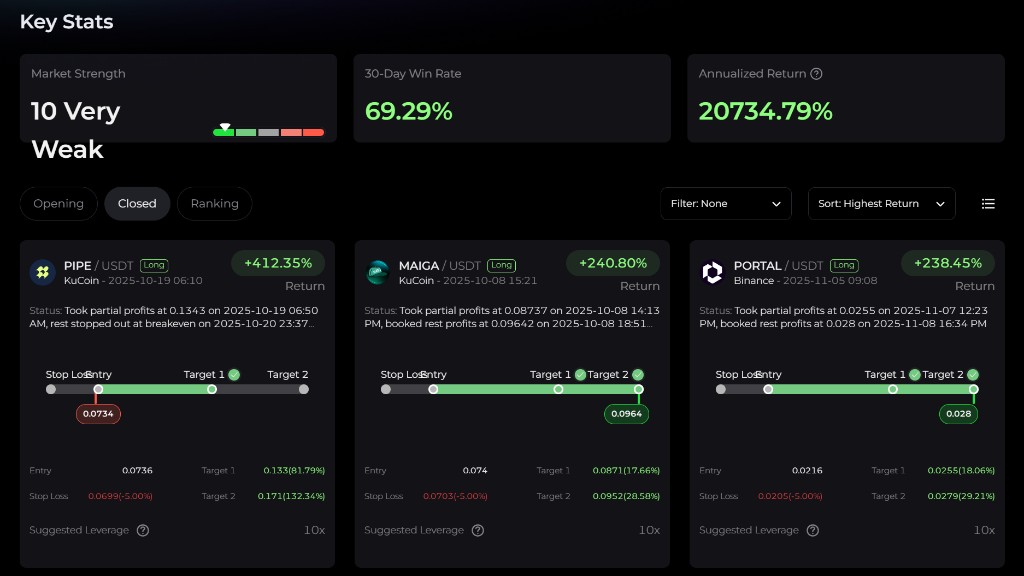
At the top of the dashboard, Crypto Radar shows three core metrics:
| Metric | What it means |
|---|---|
| Market Strength | A real-time score from 0 to 100 describing how strong or weak the overall crypto market is |
| 30-Day Win Rate | The percentage of recently closed signals that finished profitably over the last 30 days |
| Annualized Return | A normalized return figure based on historical signal performance, shown for context rather than as a promise |
Market Strength is grouped into five broad states:
- Very Weak (0-20) - risk-off conditions and weak momentum
- Weak (21-40) - cautious environment where failed breakouts are common
- Neutral (41-60) - no clear directional advantage; often choppy or sideways
- Strong (61-80) - healthier trend conditions where setups are more likely to follow through
- Very Strong (81-100) - high-momentum environment with stronger breakout potential
These top-line stats help you judge whether to lean into signals, size down, or stay selective.
2. Signal cards: your trade compass
Each Crypto Radar card is meant to function as a compact, actionable trade plan.
Typical fields include:
- Header and status - trading pair, exchange, signal time, and a short status update
- Entry - the suggested entry range or trigger zone
- Stop Loss - the level where the setup is considered invalid
- Target 1 - the first take-profit level; many traders use it for partial profit-taking
- Target 2 - the second and more final target level
- Suggested Leverage - a leverage guide derived from the model's confidence and volatility filters
- Unrealized / Realized Return - the running or completed return relative to position margin rather than only spot price movement
Taken together, these fields answer the three most important execution questions:
- where to get in
- where to get out if the trade is wrong
- where to take profits if the trade is working
That structure helps reduce emotional decision-making during fast markets.
3. How to use it
You can follow a simple four-step flow:
- Check Key Stats first. If Market Strength is neutral to strong, long setups may be more actionable. When the market is weak, tighten risk or consider standing aside.
- Pick a signal. Open the Opening tab and choose a card that matches your trading window and preferred exchange.
- Plan the trade. Set your entry inside the suggested range, place the stop loss at the recommended stop level, and plan to scale out at Target 1 and Target 2. A common approach is 50% / 50% profit-taking, though your own sizing rules still apply.
- Manage the position. If Target 1 is hit, many traders secure partial profit and then decide whether to close the rest at breakeven if price returns to entry. If the signal shows exhaustion while you're already in profit, you can also consider exiting earlier. If stop loss is hit, exit instead of widening the stop.
Suggested leverage should be treated as a guide, not a mandate.
4. Tabs and sorting
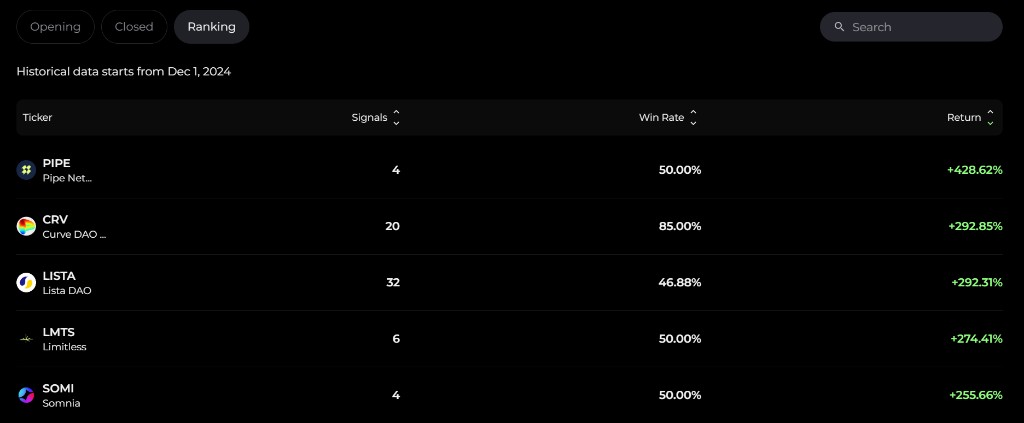
Crypto Radar separates signals into three main tabs:
- Opening - live setups that you can still act on
- Closed - completed trades, including realized return and whether targets or stop loss were reached
- Ranking - a leaderboard view by ticker, showing how many signals have appeared, win rate, and total return performance
Above the list you can:
- sort by Highest Return, Signal Time, or Unrealized Return
- filter by exchange (Binance Only, KuCoin Only, or no filter)
- search for a ticker
Crypto Radar has no Copy Trade button — you place the trades yourself on the exchange you use.
This makes it easier to focus quickly on either the freshest setups or the strongest recent performers.
5. Best practices
To get the most from Crypto Radar:
- Size by risk, not instinct. Decide your maximum acceptable loss first, then derive leverage and margin from that number.
- Do not chase. If price has already moved well past the intended entry zone, it is usually better to skip the trade than force a late fill.
- Honor stop loss. Failed setups are part of trading. The edge comes from discipline, not from widening risk.
- Review Closed and Ranking regularly. They help you identify which tickers, structures, or conditions are currently working best.
- Use AI follow-up tools when needed. If you want an extra check before acting, ask Alphio AI for additional technical context on the same name.
6. Final thoughts
Crypto Radar is designed to simplify short-term crypto trading by mapping out the trade structure for you: entry, risk, targets, and leverage guidance.
It does not remove the need for judgment, but it does make execution faster and more organized. Follow the signals selectively, manage risk tightly, and use the scanner as an edge in fast-moving perpetual markets.
Stay disciplined. Stay selective. Let the AI do the heavy lifting, but keep final control in your hands.
7. Frequently asked questions
Does leverage change the stop price?
No. Leverage changes your exposure and the speed at which profit or loss affects your margin, but it does not change the underlying stop level shown by the setup. The stop price is based on the signal structure, not on how aggressively you size the position.
Are returns net of fees or funding?
Displayed returns are best understood as strategy-reference performance, not a guaranteed after-cost result for every user. Actual execution outcomes can differ because of trading fees, funding payments, slippage, and how closely your own fills match the signaled levels.
Why is leverage shown as "Suggested" instead of one fixed number?
Because leverage should still depend on your own account size, risk tolerance, and the market context. The product can suggest a range based on model confidence and volatility filters, but the final leverage choice should remain with the trader.
Why is the Annualized Return so high?
Annualized Return is a normalized figure based on historical signal performance over a shorter measurement window. It is useful for understanding recent strategy behavior, but it can look extreme in fast-moving markets and should never be interpreted as a forward guarantee.
This page is available as plain Markdown at https://alphio.ai/docs/discover/crypto-radar-tutorial.md. An index of every page, with a one-line summary each, is at https://alphio.ai/docs/llms.txt.