SwingMax Signal Tutorial
SwingMax Signal is Alphio's AI-driven swing trading product for US stocks. It is designed to help you act on higher-conviction multi-day setups with pre-mapped entry, targets, and stop-loss levels.
Find it at: /swingmax-signal — or, on the home page (Dashboard), click the Swing Max card in the Copy Stock Signal row (web and app).
Included with Plus and above. It is not sold as a separate add-on. Copy Trade also requires Plus and above. See Subscription tiers.
1. What it is
SwingMax scans the liquid US stock universe looking for reliable swing-reversal setups, especially situations where a stock appears to be forming a stronger bottom and has a favorable chance of moving higher over the next several sessions.
The model is intentionally selective. When broader market conditions are too hostile, SwingMax can pause new entries rather than forcing weak setups into the feed.
2. Signal anatomy
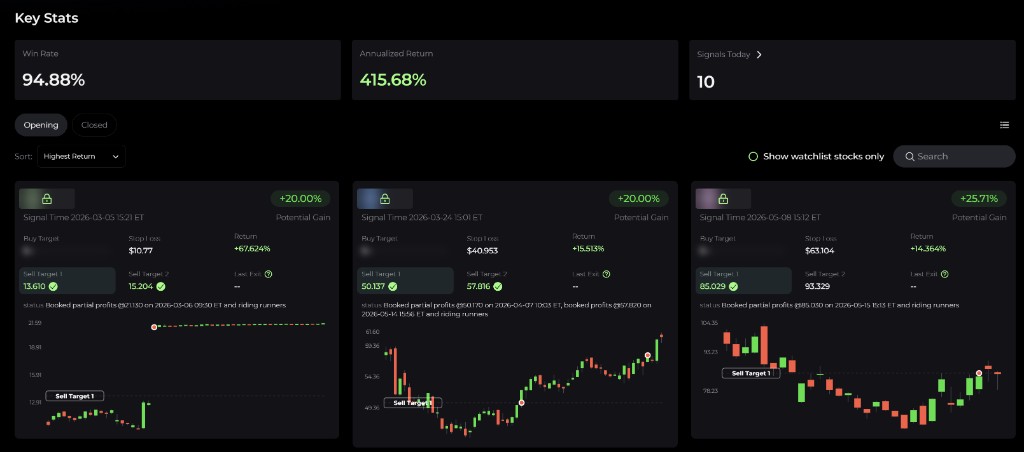
Each SwingMax card is built around a complete swing trade plan.
You typically see:
- Symbol - the US stock ticker
- Buy Target - the preferred entry level
- Sell Target 1 - the first profit-taking level
- Sell Target 2 - the second and more aggressive profit target
- Stop Loss - the risk boundary
- Signal Time - when the setup was published
- Status - whether the trade is open, partially closed, or finished
- Return - unrealized or realized performance depending on the current state
The card also provides price context and the AI's short explanation for why the setup was selected.
3. How it works
SwingMax is built around multi-day swing reversals.
The system:
- scans a broad liquid stock universe
- looks for bottom formations, momentum reversal, and technical confirmation
- filters out riskier market regimes where new entries are less reliable
- assigns a clear entry, two targets, and a stop-loss to every signal
That structure makes it easier to approach swing trading with a defined plan instead of pure discretion.
4. How to use it
There are three common ways to follow SwingMax:
- Read the live feed. Use the Opening list to review current setups and compare them by return or recency; switch to Closed for finished trades. You can also tick Show watchlist stocks only.
- Place a single trade yourself. Review the setup on the card, then place the order in your own broker account — for example through the stock trade dialog.
- Copy-trade the strategy. Click Copy Trade in the page header to mirror SwingMax entries into your connected broker account automatically (Plus and above). See Copy trading.
It is also important to keep notifications enabled, since SwingMax does not publish on a fixed schedule. New signals appear only when the model sees a qualified setup.
5. Performance and review
SwingMax exposes enough performance context for you to evaluate whether the strategy fits your style before allocating capital.
Useful views include:
- rolling strategy statistics
- recently closed trades
- price charts showing how targets and stops played out
That lets you evaluate not just whether the strategy wins, but how it wins and how it behaves in different market conditions.
6. Final thoughts
SwingMax Signal is best suited for traders who want individual stock swing setups with clear risk boundaries and a repeatable structure.
It does not remove the need for judgment, but it dramatically reduces the amount of chart scanning and trade planning you need to do yourself.
This page is available as plain Markdown at https://alphio.ai/docs/discover/swingmax-signal-tutorial.md. An index of every page, with a one-line summary each, is at https://alphio.ai/docs/llms.txt.