Meme coins
Trade Solana meme coins (and blue-chip tokens on the Crypto list) from Tokens, and use who holds the token, who is buying or selling, and what those traders write to judge the trade before you place it.
Find it at: Crypto Trade in the left menu on the web (/crypto-trade) → Tokens; in the mobile app and on mobile web, the Trade tab → Tokens.
A Solana wallet is set up for you when you first trade.
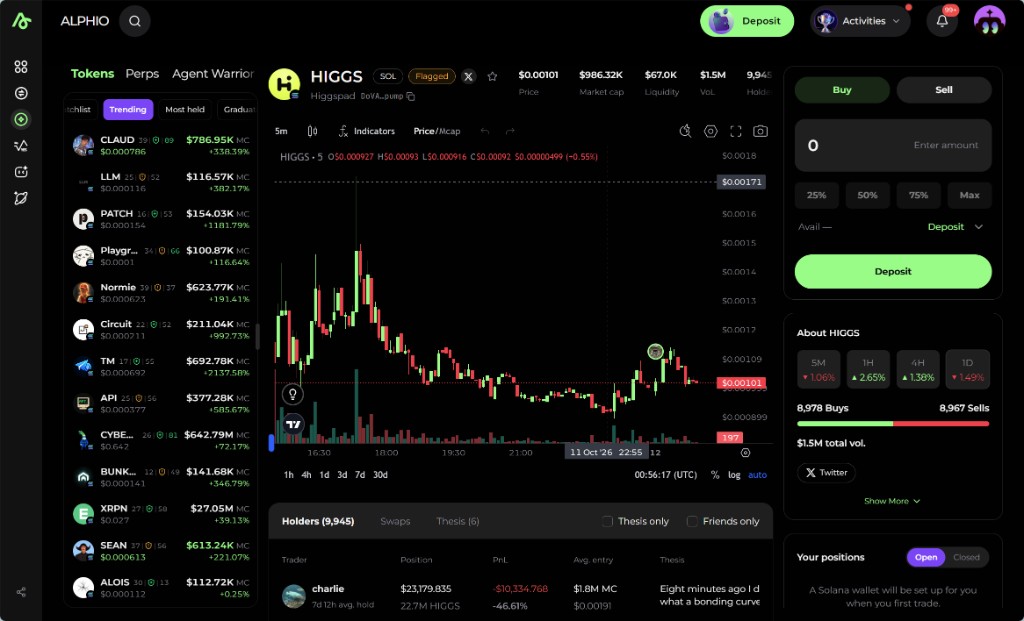
1. Crypto Trade at a glance
Crypto Trade has five tabs:
| Tab | What it is for |
|---|---|
| Tokens | Token lists and token pages — this page |
| Perps | Hyperliquid perpetuals. See Hyperliquid Perpetuals |
| Agent Warrior | An agent that trades meme coins for you from your Solana wallet. See Agent Warrior |
| Leaderboard | Traders ranked by profit on the meme trades Alphio has observed (section 11) |
| Feed | Meme trades and theses posted by the community (section 11) |
2. Token lists
The left list is how you pick a token:
| List | What it is for |
|---|---|
| Watchlist | Tokens you starred |
| Crypto | Blue-chip tokens across several chains (Solana, Ethereum, Base, BNB Chain, Monad). Price, market cap, and 24h change use global market data. The banner reads "Fees from 0.05% per trade" |
| Trending | Tokens drawing activity now |
| Most held | Tokens with the widest holder base |
| Graduated | Tokens that have left the launchpad's bonding-curve stage |
| New | Tokens that just launched |
| Near graduation | Tokens close to leaving the bonding-curve stage |
| Boosted | Tokens whose projects paid DEX Screener for boosts, sorted by boosts bought (not in the mobile app) |
Trending, Most held, Graduated, New, and Near graduation are Solana meme coins launched on pump.fun. Tokens that the automated check finds you may not be able to sell (for example, a contract that can freeze transfers) are left off these lists.
Boosted is paid promotion, not an Alphio pick. Projects pay DEX Screener to boost their tokens; Alphio does not review or endorse them, and they are not part of Trending. Trade them at your own risk.
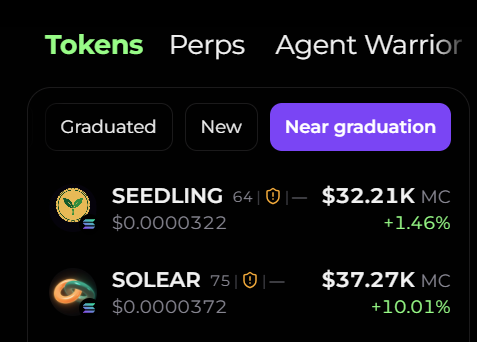
Each row shows the token name, how long it has been trading, market cap, price, and the latest percent change. Select a row to open the token page. Star a token to add it to Watchlist.
3. The token page
The header shows the token, its chain (for example SOL), a link to its X account when there is one, and the safety badge (section 9). Below it:
| Stat | What it shows |
|---|---|
| Price, Market cap, Liquidity, VoL, Holders | Live market figures |
| Narrative, Momentum | Alphio's scores for the story around the token and its recent buying pressure |
| Top10, Dev, Smart | Share of supply held by the top 10 holders, by the developer, and by smart-money wallets |
The chart can plot Price or Mcap, with range buttons from 1H to 30D. Thesis posts appear on it as avatar markers (section 8).
Research brief (bottom-left of the chart) generates a four-part AI brief on the token — narrative and heat, safety, smart money, and momentum and flow. It is a reading aid, not a recommendation.
About on the right shows buys versus sells and volume for 5M, 1H, 4H, and 1D (1H and 4H come with the research brief), plus Launchpad, Supply, Network, Created, and Contract address.
4. Buy and sell
The ticket on the right is Buy / Sell:
- You buy with USDC. Enter an amount, or use 25%, 50%, 75%, and Max
- Avail is what you can spend; Deposit adds funds
- Max slippage caps how far the price may move before the trade lands. For fast-moving tokens it may be raised automatically, and the ticket says so; pick a value to set it yourself. If the price moves past it, the trade is cancelled, nothing is traded, and no fee is charged
- Details expands the quote: Fee, a Service fee when one applies, Gas, Price impact, Max slippage, and Estimated output (with the minimum you will receive). On Solana trades Gas shows Sponsored. A cross-chain trade also shows Bridge fee and Estimated time, and you pay its gas
The fee you pay is the one shown in Details before you confirm. See also Trading fees.
Fast trading lets trades go through without a wallet confirmation each time, within per-trade and per-period limits. A trade outside those limits asks you to confirm it in your wallet. Before you confirm, the ticket tells you whether the trade goes through fast trading or needs your wallet. Some tokens need a one-time approval before you can sell. If trading a token is paused, the ticket shows Trading paused and the reason.
Your fills are posted to Square. After a Solana token trade, Alphio opens Share this trade so you can add your take. Whether you post, press Skip, or close the dialog, the trade card is published to Square under your name — skipping only leaves out your words. There is no setting to turn this off; you can delete the post afterwards. A very small fill is posted only if you add a comment, and cross-chain (EVM) trades are not posted.
Your fills for this token sit under Your positions (Open / Closed).
5. Holders
Under the chart, three tabs share one social panel: Holders, Swaps, and Thesis. Read them together. Holders tell you who is still in, Swaps tell you who just acted, and Thesis tells you what they are willing to say about it.
Two filters sit on the panel and apply to all three tabs:
- Thesis only — rows and posts that carry a written thesis
- Friends only — people you follow who share their trades
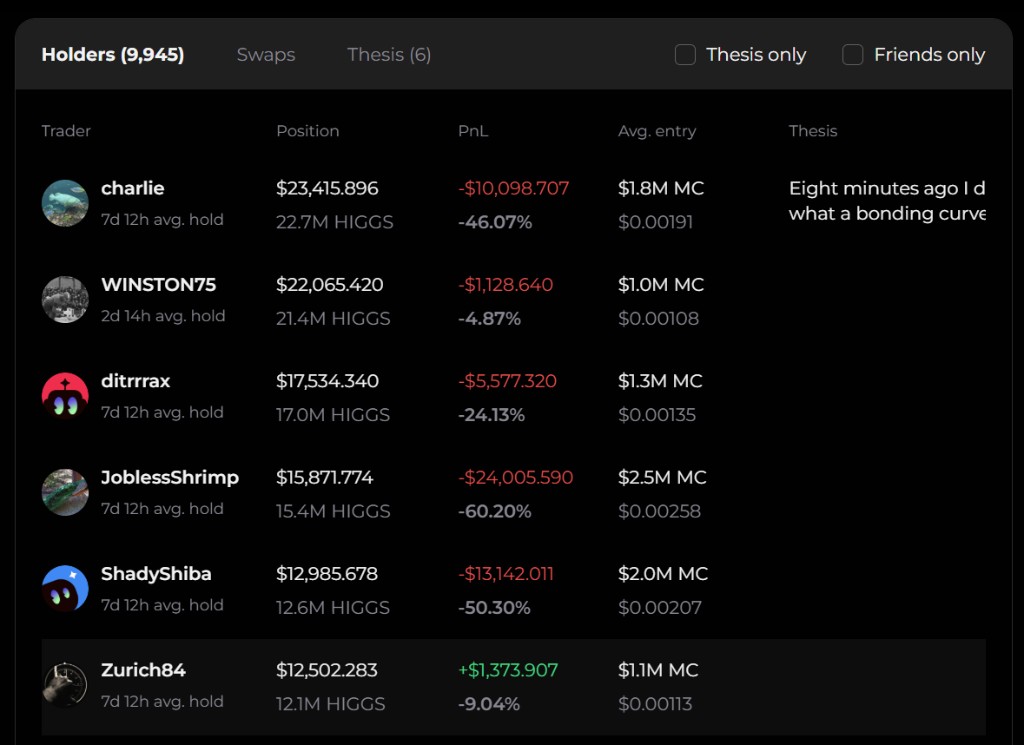
Holders lists current positions, largest first.
| Column | What to read |
|---|---|
| Trader | Name, plus approximate average hold time (for example 7d 12h avg. hold) |
| Position | Position value in dollars, and the token amount underneath |
| PnL | Profit or loss in dollars and percent. Green is up, red is down |
| Avg. entry | The market-cap level they entered at, and the token price under it |
| Thesis | A short excerpt when that holder has written one. Open Thesis for the full post |
Use the columns as a set, not one number:
- A large position with a long average hold is someone who has stayed through more than one candle
- Avg. entry in market-cap terms shows whether they bought early or late relative to the size of the token now
- A green PnL with a short hold is a different story from a red PnL on a multi-day hold
- If the Thesis cell is empty, they have a position and no public write-up
Top holders who never bought (their tokens were transferred in) are hidden, and the panel says how many. If none of the top holders bought the token, the panel warns that this often means an airdrop to well-known wallets to fake credibility.
6. Swaps
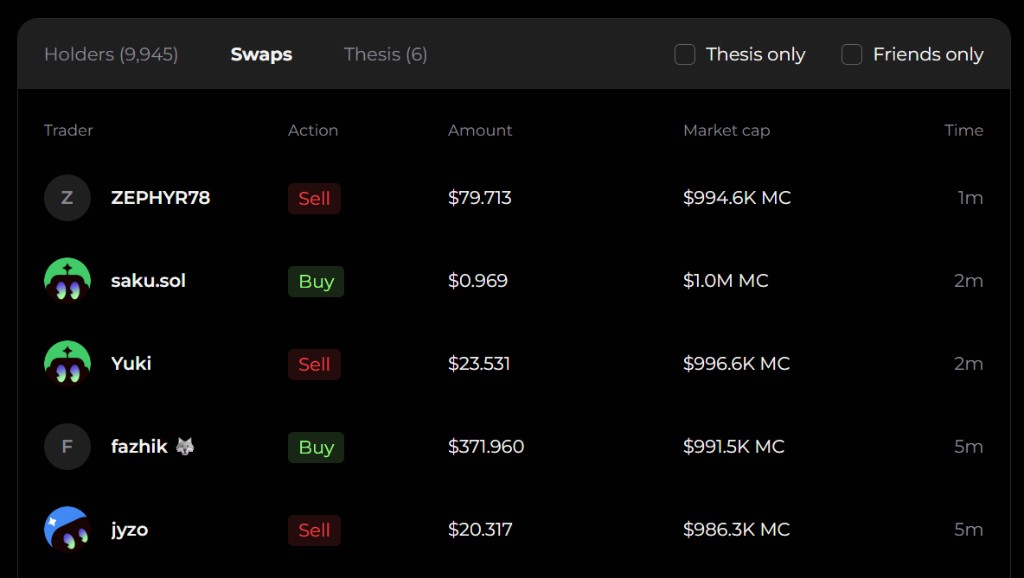
Swaps is the live tape for this token. Each row is one fill, newest toward the top.
| Column | What to read |
|---|---|
| Trader | Who traded |
| Action | Buy or Sell |
| Amount | Dollar size of that fill |
| Market cap | Token market cap at the time of the fill |
| Time | How long ago (1m, 5m, and so on) |
The tape answers questions the chart does not:
- Are the latest prints mostly buys or mostly sells?
- Are sells small, or is size leaving at the current market cap?
- Did a name you saw in Holders just sell, or are they still holding the position listed there?
- Is activity clustered in the last few minutes, or is the tape quiet?
A single small buy does not mean the token is turning. Compare size, side, and the market cap on the row with the position still shown under Holders.
7. Thesis
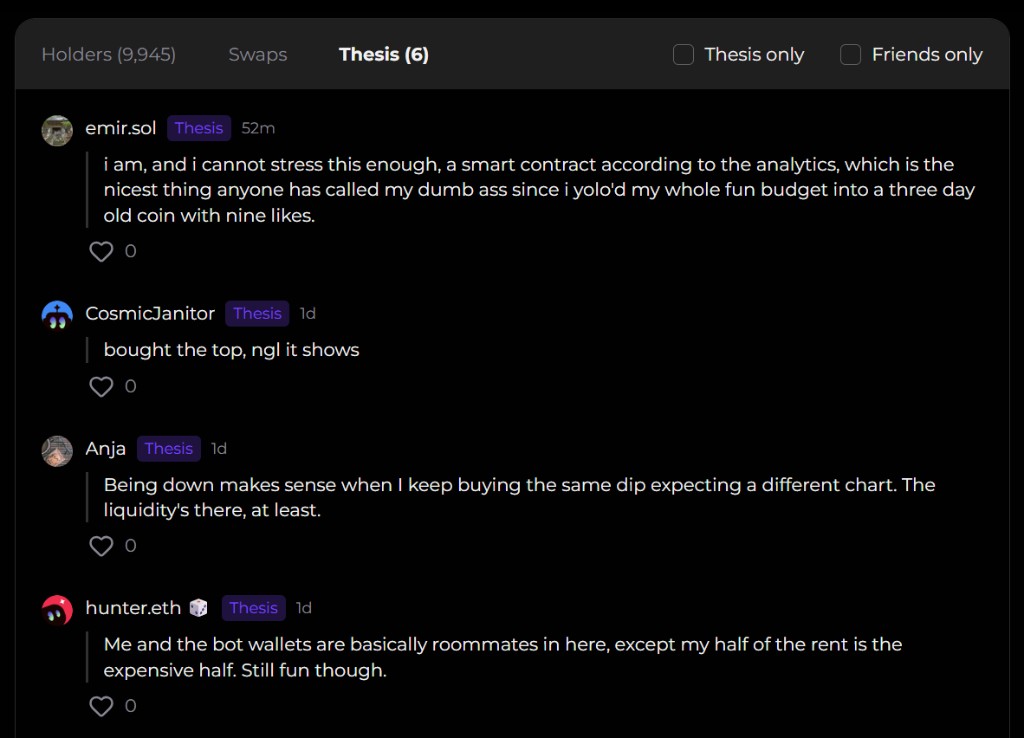
Thesis is a feed of posts written by holders. Each post shows the author, a Thesis badge, how long ago it was posted, the text, and a like count.
A thesis is that trader's own comment on their position. It is not Alphio research, not a signal, and not a promise that the chart will do what the post expects.
Read a post against the other two tabs:
- Check Holders for whether the author still has size, what their average entry was, and whether they are up or down
- Check Swaps for whether they are adding or leaving after they wrote it
- A high like count only means other people marked the post. It does not make the claim more reliable
Thesis only hides holders and swaps that have no write-up, so you can stay on people who stated a view. Friends only limits the same three tabs to people you follow.
8. Theses on the chart
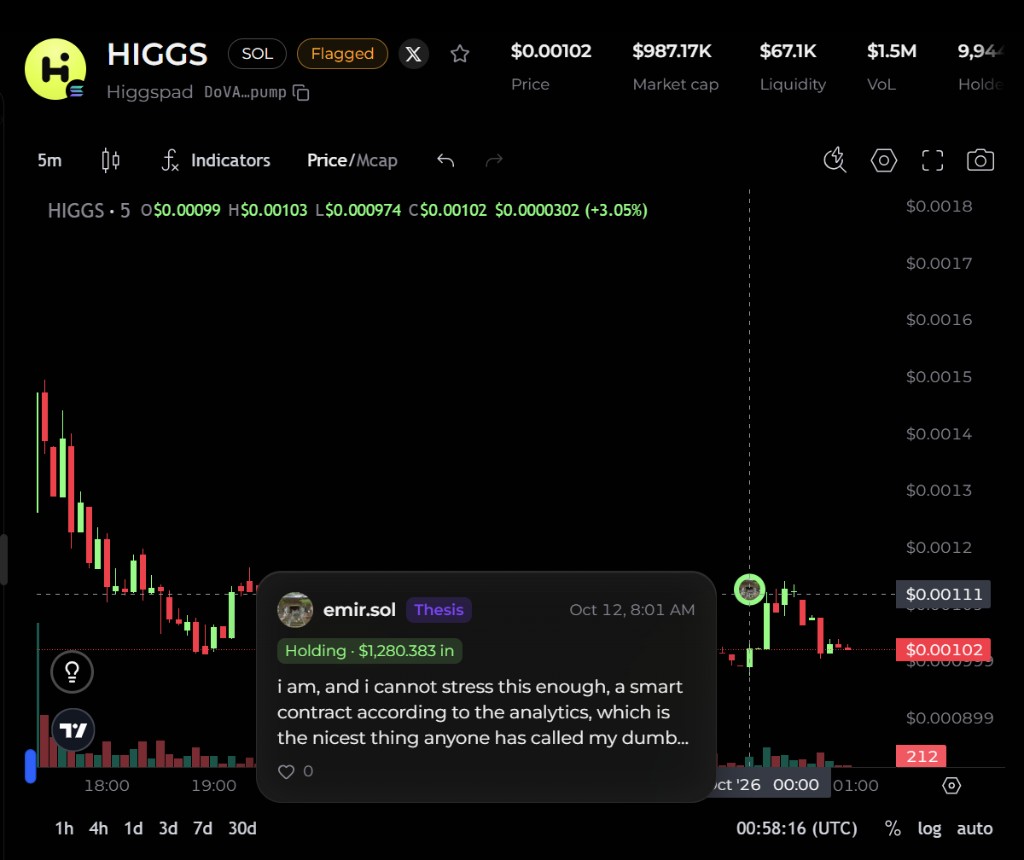
Thesis posts are also pinned to the chart as avatar markers, so a sentence lines up with the price when it was written.
Select a marker. The card shows:
- Author and the Thesis badge
- Time of the post
- What they did — Bought, Sold, or Holding, with the dollar amount
- The post text, truncated when it is long
- Like count
Use the marker when you want the comment in price context: where on the move they were talking, and whether they still hold. The full text, and posts that are not pinned on the visible range, stay in the Thesis tab.
9. Shield and Flagged
Meme coins get an automated safety badge in the header:
| Badge | Meaning |
|---|---|
| Shield | The automated check found none of the risk patterns it looks for |
| Flagged | The check found one or more risk patterns in who holds the supply — for example a large developer holding, snipers, insiders, bundlers, bots, or a top-10 concentration |
| No badge | Not assessed, or a blue-chip token on the Crypto list |
Tokens the check finds you may not be able to sell are kept off the lists, but a direct link can still open one, and it shows no badge. When there is no badge, open Research brief → Safety before you buy: it reads All checks passed, Flagged, or Not assessed — and "not assessed" does not mean safe.
The badge is an automated snapshot, not a verdict and not investment advice. Shield does not mean a token is safe to buy, and Flagged does not mean it is a scam. Open Research brief → Safety to see the underlying figures. The same check drives the warning mark on token trade posts in Square.
10. Mobile
- In the mobile app, the token page tabs are Holders, Feed, Community, and About, with Thesis only and Friends only filters and the same thesis markers on the chart.
- The Boosted list isn't in the mobile app; it's on desktop and mobile web.
11. Agent Warrior, Leaderboard, and Feed
- Agent Warrior — set a total budget in USDC from your Solana wallet, how often the agent wakes up, and a plain-language prompt for its strategy. The agent then scans meme coins and trades for you. It needs Fast trading turned on, and its runs consume Credits. If Credits run out it pauses and keeps its positions until you top up and resume. Stop Agent & Flatten ends the agent and tries to sell all of its positions. PnL & Positions shows how it is doing. See Agent Warrior for setup, pause reasons, and what happens to positions when it stops.
- Leaderboard — traders ranked over 24H, 7D, or 30D, based on the trades Alphio has observed (realized plus unrealized profit, average cost). Select a trader to open their wallet page. The home page Weekly Top Traders strip comes from this board.
- Feed — meme trades and theses from the community, newest first.
12. Risk
- Meme coins can move hard on thin liquidity. The header liquidity figure and the buy/sell split are there so you can see that before you size a ticket.
- Another trader's PnL, average entry, thesis, or likes are not a recommendation. People can be early, hedged elsewhere, or wrong in public.
- Boosted tokens are paid placements. A boost says nothing about the token's quality.
- Your fill can differ from the last row on Swaps. Price moves between their print and yours, and a thin book moves when you trade.
- A Flagged token needs a closer look before you buy. The badge itself is not a full explanation of the token.
- Only use funds you can afford to lose.
For which other assets Alphio can execute, see Supported trade assets.
This page is available as plain Markdown at https://alphio.ai/docs/trade/meme-coins.md. An index of every page, with a one-line summary each, is at https://alphio.ai/docs/llms.txt.