Prediction markets
Trade real-world event outcomes on Polymarket markets.
Find it at: Prediction in the left menu on the web (/social-trade); the Prediction view of the Trade tab in the mobile app.
Try the demo below:
1. Availability
Prediction markets are not available in every country. Access is blocked in a number of regions — including the United States, United Kingdom, France, Germany, Italy, Belgium, the Netherlands, Poland, Russia, Japan, Australia, Singapore, Taiwan, Thailand, mainland China and Macau — as well as Ontario and parts of Ukraine.
Your region is determined from your IP address at the time of the request. If your location cannot be determined, access is denied. This restriction is enforced automatically and Alphio cannot grant exceptions or make manual adjustments. Using tools to disguise your location is a breach of the Terms of Service.
2. The Prediction page
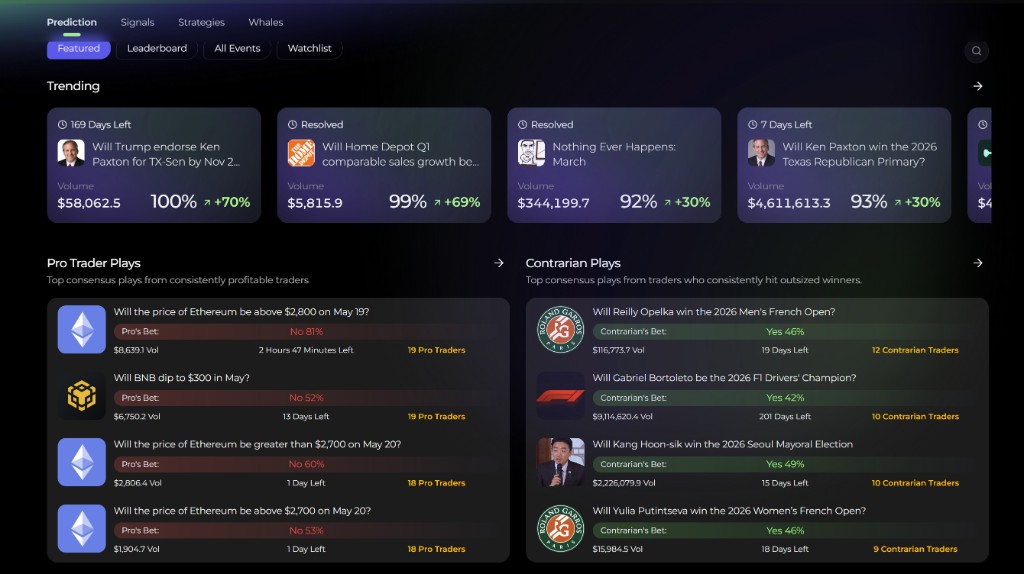
The Prediction page has four tabs:
- Leaderboard (opens first) — Polymarket's top traders by category and period, next to a live feed of their trades. You can copy a single trade from the feed. See Leaderboard Flow — Copy Trading Guide.
- Trending — a strip of breaking markets, followed by the full list of events.
- Near-settlement portfolio — builds a basket of markets that settle soon and buys the YES side of each leg within a budget you set, with a batch history of past baskets.
- Watchlist — events you saved.
A search button finds events by name.
3. Event detail page
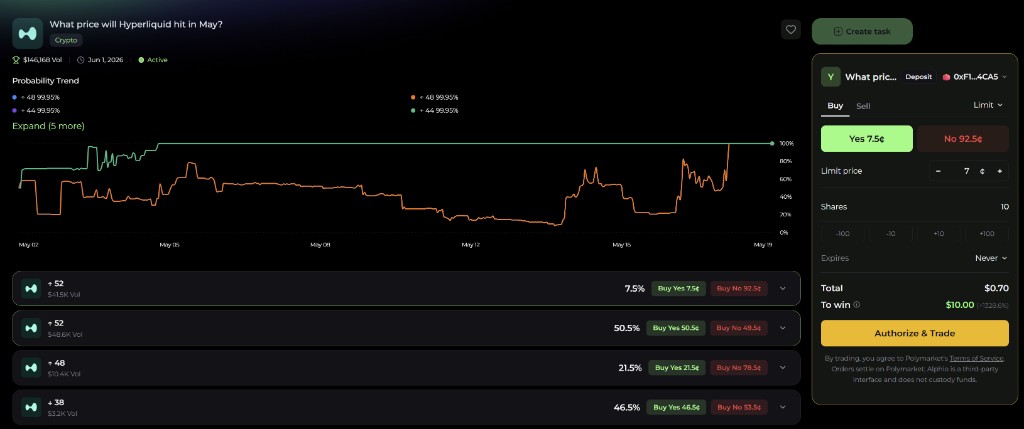
Tapping any event opens its detail page, the canonical surface for analysis and order placement on a single market.
It includes:
- Probability trend — chart of YES probability over time, so you can see momentum, reversals, and major news-driven moves
- Top holders — the largest YES and NO positions on the market, including the wallet addresses (click through to a user profile)
- Activity feed — recent trades on the market — size, side, and price — to gauge live flow
- AI commentary — Alphio AI's plain-language read on the event: what the market is pricing in, what would move it, and whether the current price looks rich or cheap
4. User profile
You can click any trader (from the top-holders list, activity feed, or the leaderboard) to see their profile. The profile surfaces:
- PnL curve — historical P&L for that user
- Trade stats — win rate, average ticket, recent activity
- Allocation — current open positions and how their portfolio is distributed across markets
- Bet cost distribution — average entry price profile, to gauge whether they hunt long shots or grind near-certains
Use this to vet a trader before treating their flow as signal. To copy a single live trade, see Leaderboard Flow — Copy Trading Guide. To automatically mirror a Hyperliquid Vault instead, see Copy Trading Guide (Hyperliquid).
5. Connecting and funding
Connect Polymarket once before your first trade. Connecting authorises Alphio to sign Polymarket trades for you under a restricted policy, so individual orders don't need a wallet signature. The same permission carries out withdrawals you confirm with an email code. You can revoke it with Unlink Polymarket once your open orders, copy-trading, positions, settled positions to claim and balance are cleared. A one-time setup deploys your Polymarket deposit wallet (gas is sponsored).
Deposit. Polymarket settles in USDC.e on Polygon. Send USDC.e on Polygon from any wallet or exchange to the deposit address shown in Add funds to Polymarket. Once it arrives, it is converted 1:1 into pUSD, which is what you trade with; the page updates automatically.
- Only USDC.e on Polygon is accepted. Native (non-bridged) USDC is a different token: if it lands at your deposit address it is not credited automatically — contact support to recover it. Funds sent from another network, or in another token, cannot be recovered.
- Buying with a card is not available for Polymarket.
Withdraw. Withdraw from Polymarket converts pUSD back to USDC.e and sends it on Polygon to an external wallet you control — not your in-app wallet, and not the deposit address itself. You confirm with a 6-digit code sent to your account email, so an email must be bound to your account. Withdrawals can't be cancelled or reversed once submitted. See also Withdrawals.
6. Placing a bet
- Choose the outcome and side. Buy or Sell the outcome you want — YES or NO, or a named outcome.
- Choose the order type. Market fills against existing liquidity now. Limit sets your own price between 1¢ and 99¢ per share (0.1¢ to 99.9¢ on markets that trade in 0.1¢ steps); you can set when a limit order expires (never, end of day, after 5 minutes / 1 / 12 / 24 hours, or a custom time). There is also a Quick buy view where you enter a USDC amount.
- Review. The ticket shows shares, total, what you win if you're right, and the fee (see Trading fees). Each winning share pays $1 at resolution.
- Submit. Alphio signs the order under the authorisation you granted and sends it to Polymarket's order book. An order that crosses the spread fills against existing orders; the rest rests on the book until matched.
Your Polymarket positions, open orders and trade history are on your account page. Cancel a working order from the open-orders list. To exit before resolution, sell your shares at the current price — if there is no buyer, you may not be able to sell.
7. Resolution and claiming
Markets resolve through Polymarket and UMA's optimistic oracle, not through Alphio. A proposer submits an outcome; during a dispute window anyone can dispute it by posting a bond; if undisputed, the proposed outcome resolves the market. If disputed, UMA's voting mechanism decides.
After a market resolves, winning positions show a Claim button on your account page — claiming moves the winnings into your Polymarket balance. Losing positions can be cleared from the list.
Alphio cannot change or appeal an outcome. The market page on polymarket.com shows the current resolution stage and any disputes.
This page is available as plain Markdown at https://alphio.ai/docs/trade/prediction-markets.md. An index of every page, with a one-line summary each, is at https://alphio.ai/docs/llms.txt.