Delete Account
Close your Alphio account. You can't undo it yourself — read carefully before proceeding.
There are two ways to start deletion:
- Alphio mobile app — Account & Security → Delete Account. To reach Account & Security, open your own profile in Square and tap Edit profile.
- Deletion request form — alphio.ai/delete-account. Submitting the form files a support ticket for the team to action; it does not delete the account on the spot.
There is no Delete Account button on the Alphio web app (PC or H5). If you only use Alphio on the web, use the deletion request form.
1. What deletion actually does
When the account-cancel call runs, Alphio does the following:
| Step | Effect |
|---|---|
| Account record | Your Alphio user record is deactivated. You can no longer sign in and the account stops resolving anywhere in the product. |
| Sign-in identities | Your OAuth / provider identity links are removed, so the provider account is no longer tied to this Alphio user. |
| Sessions | Login state is cleared on all platforms (web and app) — every device is signed out immediately. |
| Push tokens | Your device push-token records are cleared, so notifications stop. |
| Invitations | Any invitation records tied to your account are revoked. |
Because deletion deactivates the account rather than purging it, treat deletion as loss of access, not as a guaranteed erasure of every stored record. Content produced under the account — chat history, watchlists, alerts and tasks, Credits ledger, feedback threads — is no longer reachable by you once the account is gone, but this call does not itself purge that data row by row.
If you need data actually erased rather than just deactivated, say so explicitly in the deletion request form or contact support, so the team can handle it as a data request.
There is no self-service undo. Once the cancel call completes, you cannot sign back in to the same account.
2. What doesn't get deleted
Alphio doesn't custody on-chain assets or broker accounts on your behalf — those relationships are independent of your Alphio account.
| Asset / connection | What happens |
|---|---|
| Alphio wallet (EVM and Solana) | Export your private key or withdraw your balance to zero before deleting. Once the account is deleted, the wallet and any assets left in it can't be recovered through Alphio, and Alphio is not responsible for the resulting loss (see Wallets). |
| Wallets you previously linked from outside Alphio | Unaffected — the keys live in your own wallet app, not in Alphio. |
| SnapTrade broker connection | The broker account itself remains with your broker. Alphio loses its OAuth grant but you keep the direct broker relationship. |
| Hyperliquid on-chain state | Unaffected. Positions and balances belong to the wallet, not to Alphio. |
| Telegram chat with Alphio bot | The bind is removed; if you sign up again with a different account, you can reconnect the bot from scratch. |
3. Pending charges and refunds
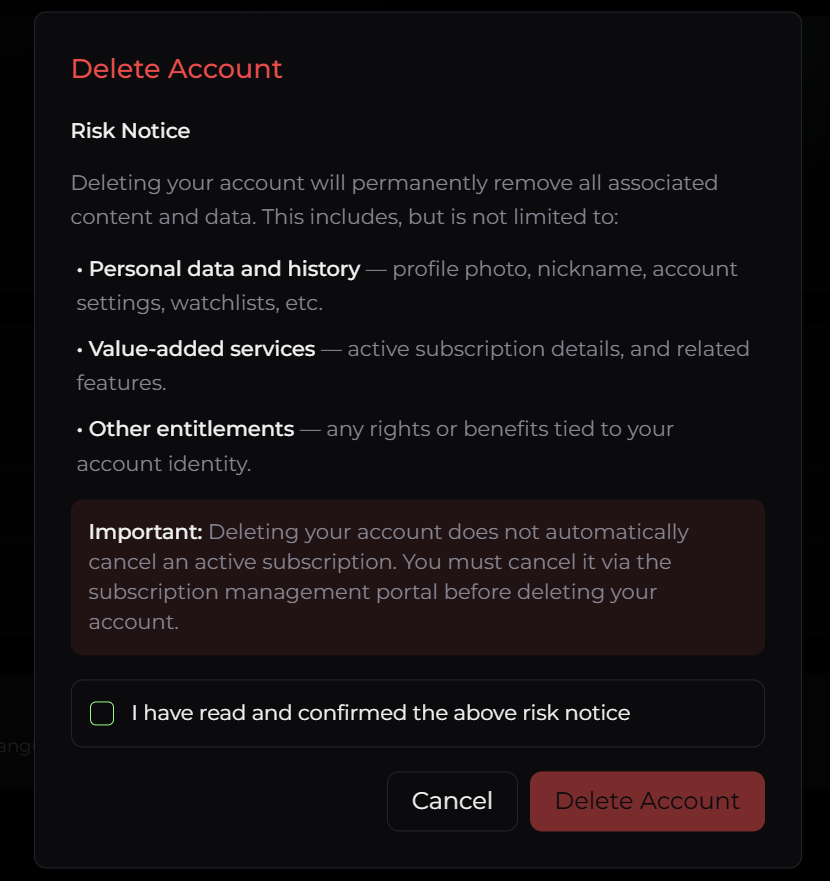
Deleting your account does not cancel an active subscription. Cancel it first:
- Web (card) subscriptions — use Cancel Plan on the Plan & Billing page.
- App Store / Google Play — cancel in the store's subscription settings.
- MoonPay — cancel through MoonPay's management page.
See Subscription and Billing. There's no refund for the unused portion of a period.
4. Re-signup with the same email
The same email address is free to use again.
| Scenario | Behavior |
|---|---|
| Re-registering with the same email | Allowed. You get a brand-new account with a new account ID and no prior history — no waiting period. |
| Old chat history, Credits, referrals | Not carried over. The new account starts empty. |
5. How to initiate deletion (mobile app)
The app is the only surface with a built-in deletion flow. It runs in two screens:
- Open Account & Security → Delete Account (from your own Square profile, tap Edit profile to reach Account & Security).
- Alphio shows a short survey — a question with a list of reasons for leaving. Pick at least one. If you pick the last option, you must also type a free-text comment before you can continue.
- Tap through — this submits your survey answers.
- A separate confirmation screen opens with a risk notice — including the reminders to empty or export your Alphio wallet and to cancel your subscription first. Tick I have read and confirmed the above risk notice to enable the confirm button.
- Confirm. The account is cancelled server-side, you're signed out of every device, and the app returns to the welcome screen.
The survey and the actual cancellation are two separate steps: submitting the survey only records feedback for the team — it deletes nothing. The account is not cancelled until you confirm on the second screen.
6. Requesting deletion without the app
If you don't use the mobile app, open alphio.ai/delete-account and submit your account email. This raises an account-deletion ticket with support rather than deleting immediately — the team follows up on the email you submit, so use the address your account is registered with.
7. Data export before delete
If you want to keep a copy of your data — chat history, watchlists, Credits ledger, invoices — export it before initiating deletion.
Available exports today:
- Invoices — the Orders list on the Plan & Billing page has no PDF download; for Stripe invoices, use the Stripe billing portal (Manage Plan).
- Credits ledger — the Usage page shows the full ledger; manual screenshot for now.
This page is available as plain Markdown at https://alphio.ai/docs/account/delete-account.md. An index of every page, with a one-line summary each, is at https://alphio.ai/docs/llms.txt.