Crypto research
Research for crypto spot tokens and Hyperliquid perpetuals, with an AI overview, on-chain analysis, and chat follow-ups.
Find it at: /symbols/<SYMBOL> for a spot token (for example /symbols/BTC; older /crypto/... links redirect there) — open it from top-bar search, your watchlist, or a chat card. On the PC web app, Hyperliquid perpetuals live under Crypto Trade → Perps (/crypto-trade/perps).
1. Crypto spot detail
The spot detail view is a single page:
- Chart. K-line with time-range toggles (LIVE, 1D, 1W, 1M, 3M, 1Y, 5Y), line / candle switch, and an optional signal overlay.
- AI Overview. An AI-written summary of the token. Generating or refreshing it consumes Credits; the button tells you before it runs.
- Snapshot. 24h high / low, 24h volume, volatility, all-time high and low, correlation with BTC, ROI, and market cap. Price and 24h change in the header update live.
- Chain Analysis. Holding Amount, Time Held, and Whale Holdings — how supply is spread across whales and other holders, and how long holders have held.
- Similar coins, a Whitepaper Summary, a news strip, and community posts about the token.
The right-hand rail has AI Analysis shortcuts (technical analysis, should-I-buy, price prediction) and a Trade panel. The header also has an exchange switcher (Hyperliquid, Binance, KuCoin, OKX, Kraken) that changes which venue's quote you see. Binance quotes are view-only — trading inside Alphio goes through Hyperliquid (or a centralized-exchange account you connected earlier). Where a matching Hyperliquid perpetual exists, the header links straight across to it.
2. Hyperliquid perp detail
On the PC web app, open Crypto Trade → Perps and pick a contract; the detail view sits next to an always-visible trade panel.
- Perp header. Mark price, oracle price, 24h change, 24h volume, open interest (in USD), funding rate, and the contract's max leverage.
- Tabs under the chart. Holders, Swaps, Thesis, Order Book, Trades, About, Technical, and News. Holders and Swaps only cover tracked traders (vault holders and top Hyperliquid traders), not every account.
- Leverage scaffolding. Margin tiers and the max leverage for the contract are enforced against your order size.
- Order entry. Use the trade panel on the right. See Hyperliquid Perpetuals for the execution flow.
The Perps list also covers non-crypto contracts — stocks, commodities, indices, FX, and pre-IPO perpetuals — under its category filters.
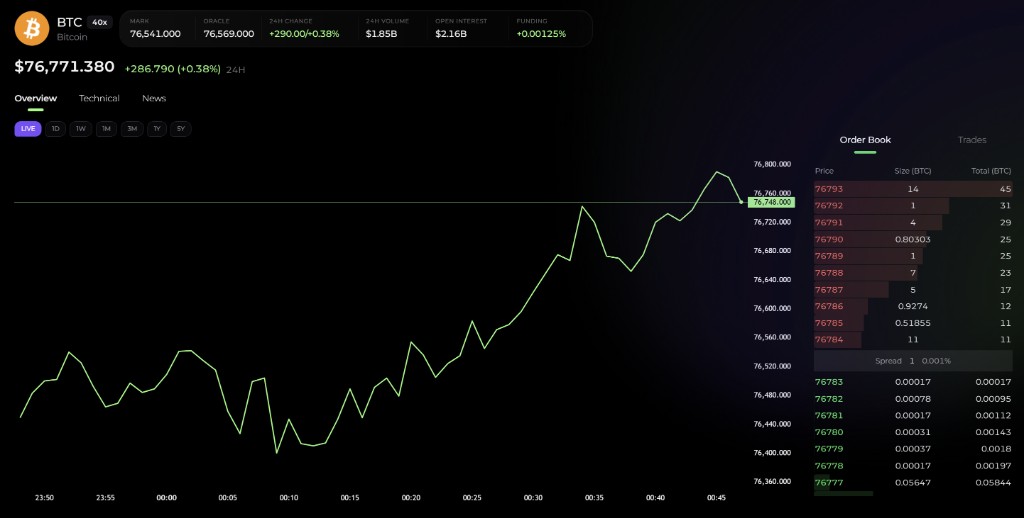
3. K-Line chart settings
- Time ranges. Pick from the ranges above the chart.
- Chart type. Switch between line and candle.
- Persistence. Your selected time range is remembered on the device and browser you chose it on. It is not synced to your account or across devices.
4. Asking Alphio AI
For anything beyond the page, use chat. Examples:
"BTC funding rate now"— returns the current funding-rate readout for the perp."On-chain whales for SOL"— pulls whale holding concentration."Compare ETH spot vs ETH-USD perp"— cross-rail view."What are people saying about DOGE on X this week?"— searches recent posts."Long ETH 2x on Hyperliquid"— returns a Strategy Option card with a suggested order to review. To execute it, use the Hyperliquid trade panel.
See Chat cards for the cards these prompts emit and How to chat for prompt patterns. For Solana and other on-chain meme tokens, see Meme coins.
This page is available as plain Markdown at https://alphio.ai/docs/research/crypto-research.md. An index of every page, with a one-line summary each, is at https://alphio.ai/docs/llms.txt.