Copy Trading Guide (Hyperliquid)
Copy Trading mirrors Hyperliquid Vaults — pooled accounts run by traders on Hyperliquid. You set an allocation once, and Alphio copies the Vault's trades into your own Hyperliquid account — either proportionally or with a fixed amount per trade.
You can browse and follow listed Vaults. On this Hyperliquid rail, individual wallets and trader profiles are for research only and cannot be copied. To copy a single Polymarket trade instead, see Leaderboard Flow — Copy Trading Guide.
Find it at: the Hyperliquid Vault card on the Dashboard on the web (/social-trade?tab=copytrade); the Copy Vault page in the mobile app, opened from the Home screen.
1. Read this first
Copy trading changes things in your own Hyperliquid account. Three points matter before you start:
- Stopping a copy closes your copied positions. When you stop copying, Alphio closes the positions it opened for you at market. This happens immediately and may realise a loss, and there is no option to keep them open. Stop only when you're willing to exit.
- Copying changes your leverage. Copied trades are placed in your main Hyperliquid account, not a separate one, and Alphio sets your leverage for each copied market — to the Vault's in Fixed ratio mode, or to the leverage you pick in Fixed amount mode. That setting applies to your own positions in that market too.
- Copied positions mix with your own. Because everything lands in your main account, copied positions and positions you opened yourself sit side by side and cannot be separated automatically.
A minimum allocation of 10 USDC applies. Copy trades draw margin directly from your Perps balance, so keep USDC there.
2. Who this is for
Copy Trading on Hyperliquid is useful for:
- users who want exposure to crypto trading without constant active execution
- users who prefer following established strategies instead of making every market decision themselves
- users who want more systematic, automated participation
3. Why follow Vaults
On Hyperliquid, a Vault is a pooled account run by a trader, with its own deposits and a public track record. Vaults are worth following for three reasons:
Real, persistent capital
Vaults are not one-off experiments. They reflect real capital being deployed over time.
Observable behavior
Their actions can be tracked and evaluated: entries, exits, position increases, position reductions, and behavior across changing market conditions.
Market-tested strategy profiles
Stronger Vaults typically show some combination of long-term profitability, repeatable behavior, and more disciplined risk control.
4. How it works
Choose a Vault -> pick a mode and allocation -> Alphio copies the trades
You choose one of two modes when you start. The mode can't be changed afterwards — to switch, stop the copy and create a new one.
Fixed ratio mirrors the Vault proportionally to your allocation, using the Vault's leverage:
- when the Vault opens, you open proportionally
- when the Vault scales in, you scale in
- when the Vault reduces, your position is reduced by the same proportion
- when the Vault closes, your position is closed
Fixed amount invests a fixed USDC amount (per-trade, notional) each time the Vault opens a new position, capped by your total allocation:
- you pick a leverage from 1x to 20x; actual leverage is capped per coin, and many coins allow only 3x
- when the Vault reduces a position, your entire position in that coin is closed — not reduced proportionally
- for the same coin and direction, only the first entry within 1 hour is copied; direction reversals are exempt
- even a small test position by the Vault triggers the full per-trade amount
- if your free allocation can't cover the next entry, that entry is skipped rather than shrunk
In both modes, mirrored orders are placed as immediate-or-cancel market orders, so your fill price can differ from the Vault's.
5. Fees
There is no profit sharing for copy trading. You pay Hyperliquid's normal trading costs on every mirrored order, plus Alphio's builder fee — the same fee that applies to any order routed through Alphio. See Trading fees.
Alphio does not take a share of your copy trading profits.
6. How to get started
Step 1: Choose a Vault to follow
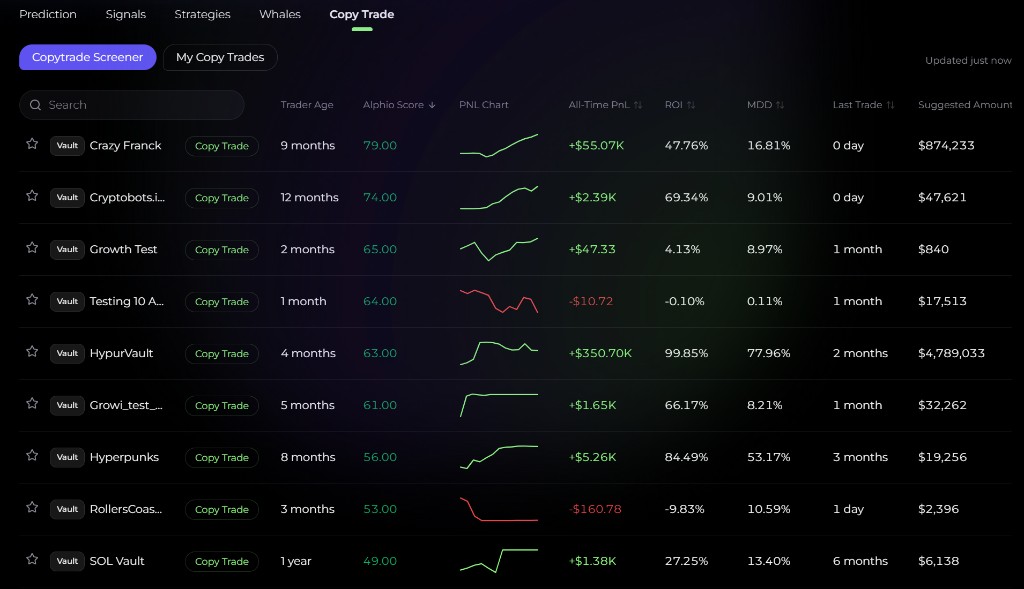
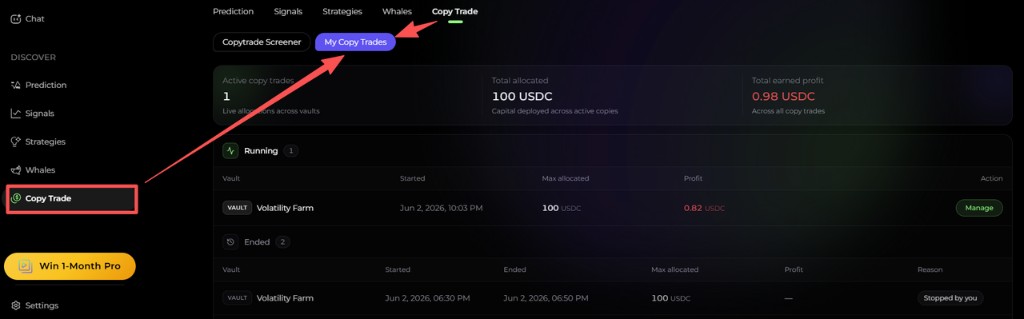
The Copytrade Screener lists Vaults; My Copy Trades shows the copies you run, and Watchlist the Vaults you starred. In the screener you can rule out:
- highly inconsistent performance
- short-lived abnormal performance spikes
- behavior that appears too risky or difficult to repeat
Step 2: Set your allocation
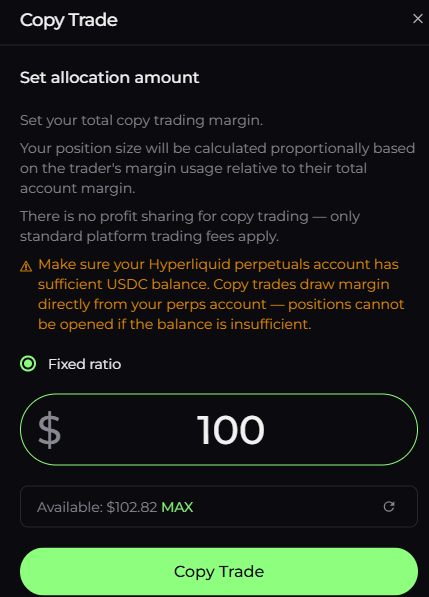
Once you've picked a Vault, choose the mode and set the Total allocation (USDC) — at least 10. In Fixed amount mode, also set the Amount per trade (at least $10; $20 or more is recommended, because below that Hyperliquid's minimum order size can push the actual investment up by about 10%) and the leverage. The dialog shows how much is available in your Perps account and warns if the allocation needs more margin than you have.
Step 3: Start copying
After you confirm the allocation, Alphio starts monitoring and mirroring the Vault immediately.
Step 4: Manage it anytime
- Modify — change the total allocation (and, in Fixed amount mode, the per-trade amount and leverage; a leverage change applies to new positions only)
- Stop — end the copy relationship, which closes the copied positions at market
7. How to evaluate Vaults
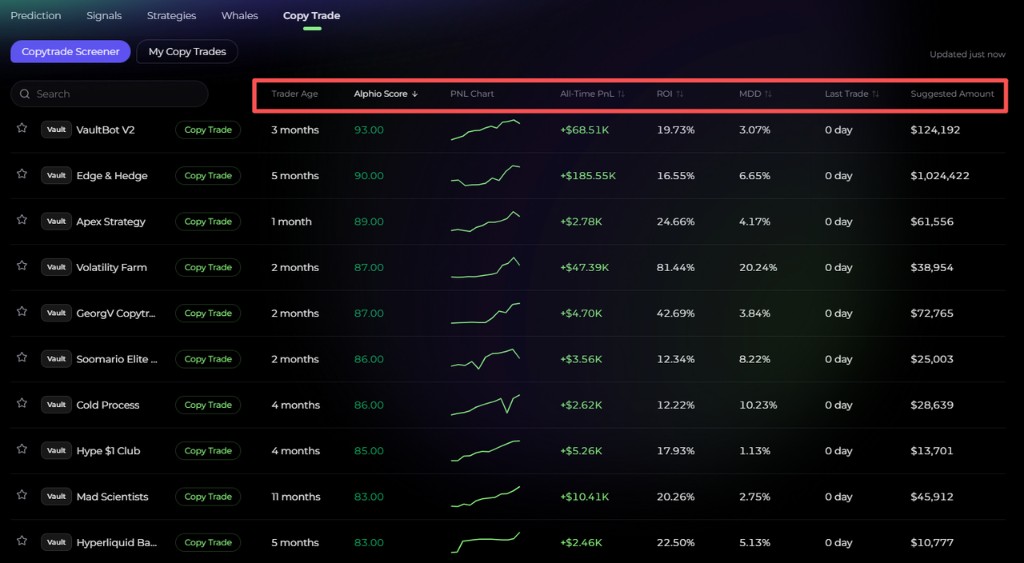
There is no single definition of a "good" Vault. Some users care most about return, others prioritize lower drawdown, higher consistency, or more recent activity.
Trader Age
How long the Vault has been active. Longer history usually gives you more data to judge how the strategy behaves across conditions.
Alphio Score
A composite rating summarizing overall profile quality, including performance, consistency, and risk characteristics.
All-Time PnL
Total profit generated across the Vault's recorded history.
ROI
How effectively the Vault has turned deployed capital into return.
Maximum Drawdown (MDD)
The largest decline from a previous peak. Lower MDD usually reflects a more conservative profile; higher MDD may indicate a more aggressive style.
Trading Activity
The Last Trade field shows whether the Vault is still actively participating in current market conditions.
PnL Chart
Helps you evaluate growth consistency, volatility, recovery after drawdowns, and long-term direction rather than relying on a single summary number.
Suggested Amount
In Fixed ratio mode, a reference allocation based on the Vault's sizing. Below it, most copied orders fall under Hyperliquid's $10 minimum order size and get rejected — the copy stays active but fills nothing. If that happens, Fixed amount mode fills far more reliably.
The best Vault is not always the one with the highest raw profit. It is the one whose behavior, risk profile, and capital usage match your own goals.
8. Risk disclosure
Even when you follow a strong Vault, risks remain:
- stopping a copy closes your copied positions at market, which can realise a loss
- your leverage for a copied market is set by the copy, and applies to your own positions in that market
- copied positions sit in your main account alongside your own and cannot be separated automatically
- execution delay between the Vault and your account
- price differences caused by market movement, since mirrored orders are market orders
- liquidity constraints during volatile conditions
- insufficient margin preventing certain copied positions from opening
Copy trading can reduce manual effort, but it does not eliminate market risk.
9. Frequently asked questions
What do I need before I start?
You need your Alphio wallet with Hyperliquid trading access set up — this happens the first time you deposit to or trade Perps — and enough USDC in your Perps balance. See Hyperliquid Perpetuals.
Can I copy an individual trader?
Not on this Hyperliquid rail. Only Hyperliquid Vaults can be copied here. Individual wallets and the tracked traders shown on Perps market pages are for research only. To copy a single Polymarket trade, see Leaderboard Flow — Copy Trading Guide.
Does Alphio take a share of my profits?
No. Alphio does not take a profit share. You pay Hyperliquid's trading costs plus Alphio's builder fee on each mirrored order.
What happens to my positions when I stop?
They are closed at market immediately. Stop only when you're willing to exit.
Can I change my allocation anytime?
Yes. You can increase or decrease the allocation while the copy is running. The copy mode itself can't be changed.
This page is available as plain Markdown at https://alphio.ai/docs/discover/copy-trading-guide-hyperliquid.md. An index of every page, with a one-line summary each, is at https://alphio.ai/docs/llms.txt.