Stocks research
Deep-dive research for US Stocks, HK Stocks, and ETFs with multi-tab detail pages.
Find it at: /stock-trade/<SYMBOL> for US stocks (the Stock Trade menu on the PC web app; older /stock/... links redirect there), /stock-hk/<SYMBOL> for Hong Kong stocks, and the ETF page for ETFs — open any of them from top-bar search, your watchlist, or an Alphio AI chat card.
1. US Stock detail page (5 tabs on PC web)
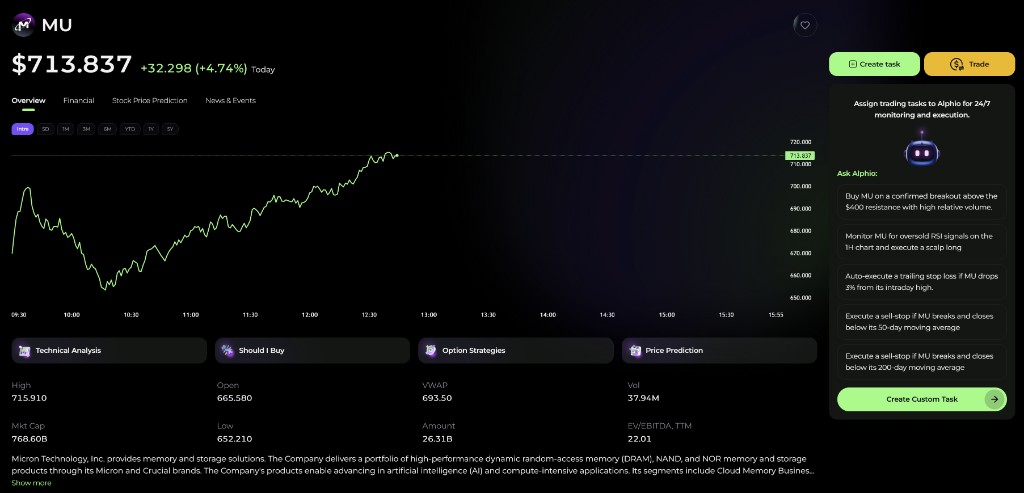
The US Stocks detail page is the deepest research surface in Alphio. On the PC web app, a TradingView K-line chart sits above five tabs, and the active tab lives in the page URL (?tab=...), so you can send someone a link straight to the view you are looking at.
| Tab | What's inside |
|---|---|
| Overview | AI Overview, quote snapshot, key ratios, company profile, valuation metrics, analyst ratings, and whale holdings. |
| Thesis | Community posts about the stock. |
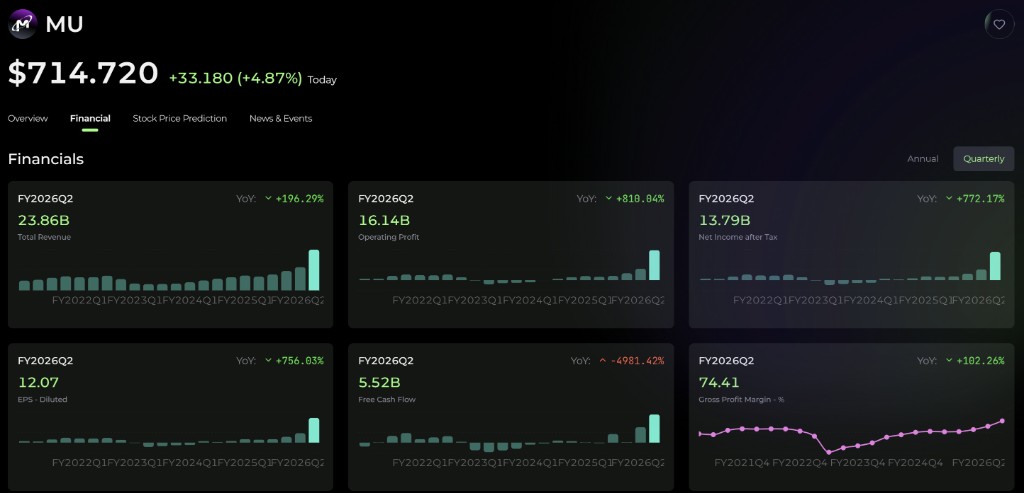
| Financial | A grid of key financial metrics, with an Annual / Quarterly toggle (Quarterly by default). |
| Stock Price Prediction | Alphio AI's price prediction, a short-term forecast chart, technical signals, and seasonality. |
| News & Events | News, Events, Monitor News, and Earnings Analysis. |
Mobile web shows four tabs (no Thesis). The app shows Overview, News, and Earnings.
The chart can overlay SwingMax, Pivot Point, and Pattern Signal markers. The right-hand rail has AI Analysis shortcuts (Technical Analysis, Should I Buy, Option Strategies, Price Prediction), Create task, and Trade, which opens the stock trade panel for your connected broker.
2. The Overview tab
Overview is the default tab and carries most of the day-to-day research surface:
- AI Overview — an AI-written summary of the company. Generating or refreshing it consumes Credits; the button tells you before it runs.
- Snapshot — headline figures plus key ratios such as P/E, P/B, and EV/EBITDA.
- Company profile — what the business actually does.
- Valuation metrics and Analyst Ratings.
- Whale holdings — which tracked institutions hold the name.
On mobile web, the Overview tab also carries the K-line chart and a People Also Watch list of peers.
3. The Financial tab
The Financial tab shows a grid of key financial metrics drawn from the income statement, balance sheet, and cash flow, and lets you switch between Annual and Quarterly reporting periods.
For anything beyond what the tab shows — full statements, multi-period comparisons, ratio derivations, peer benchmarking — ask Alphio AI in chat. See section 6.
4. HK Stock
Hong Kong stocks have their own dedicated detail page, presented as a single Overview view rather than a tab stack. It includes:
- K-line chart and quote snapshot
- AI Overview
- company news
- money flow
- analyst ratings
- valuation metrics
- financials
- trading trends
- peer names
Hong Kong quotes are at least 15 minutes delayed, as disclosed on the page itself. Hong Kong stocks are research-only — there is no trade action for them inside Alphio.
5. ETF
ETFs have their own dedicated detail page with three tabs — Overview, Technical, and News.
The Overview tab includes:
- Quote and session figures. High, low, open, VWAP, volume, and amount.
- Asset composition. The split across cash, stocks, bonds, preferred, convertible, and other.
- Weightings. Shown as Top 10 Holdings, Sectors, and — where the fund holds bonds — Bond Ratings.
- Fund profile.
- Cross-link. Holdings rows link straight into the underlying ticker's detail page.
ETF pages have no trade action inside Alphio. For deeper drill-downs such as holdings overlap or factor exposure, use chat.
6. Asking Alphio AI
Stock research scales further when you stop tabbing and just ask. A few starting prompts:
"Should I buy NVDA?"— returns a decision-style answer with Alphio AI's reasoning."Compare AAPL and MSFT cash flow over the last 4 quarters."— returns a side-by-side Cash Flow table."Why did TSLA drop today?"— pulls today's news, fundamentals delta, and flow signals."Forecast SPY over the next 3 months."— returns a forward-looking AI analysis in chat."Earnings reminders for my watchlist this week."— surfaces an Earnings Reminder card.
See How to chat for the full prompt patterns, and Chat cards for the cards these prompts emit.
7. Adding to watchlist
- From the detail page. On the PC web US stock page, click the star in the header; on HK stock and ETF pages (and on mobile web), click the heart (Add to Watchlist). It persists immediately.
- From symbol search. The Popular lists in the search panel expose the same toggle on each row.
To see your stock watchlist on the PC web app, open Stock Trade and use the Watchlist tab in the left column.
This page is available as plain Markdown at https://alphio.ai/docs/research/stocks-research.md. An index of every page, with a one-line summary each, is at https://alphio.ai/docs/llms.txt.