Backtesting Strategy
Backtesting Strategy (the Strategy Hub) lets you test trading ideas against years of historical market data, save the ones you like, run them in paper trading, deploy them live, and share them to the Square.
Find it at: /backtesting (page title Strategy Hub). On mobile web it is also the Backtesting tab of the /social-trade page, and in the app it opens as Backtest.
1. What Strategy Hub is
Strategy Hub is the backtesting surface inside Alphio. It helps you:
- explore prebuilt strategy examples
- run your own backtests from plain-language logic and trading parameters
- continue promising strategies in paper trading under live market conditions
- deploy a strategy to trade live in your own account
Instead of jumping straight from an idea to live execution, you can first validate the logic on historical data, inspect the results, and only then decide whether the strategy is worth tracking further.
Backtesting is available on every plan — Free, Basic, Plus, Pro, Elite, and Enterprise. There is no tier gate on running a backtest.
Running a backtest consumes Credits. There is no fixed per-backtest price — you are billed on actual usage once the run completes, so a longer period or a wider universe costs more. Your exact charge for each run appears in the Credits ledger on the Usage page.
2. The main tabs
Strategy Hub is organized into seven tabs:
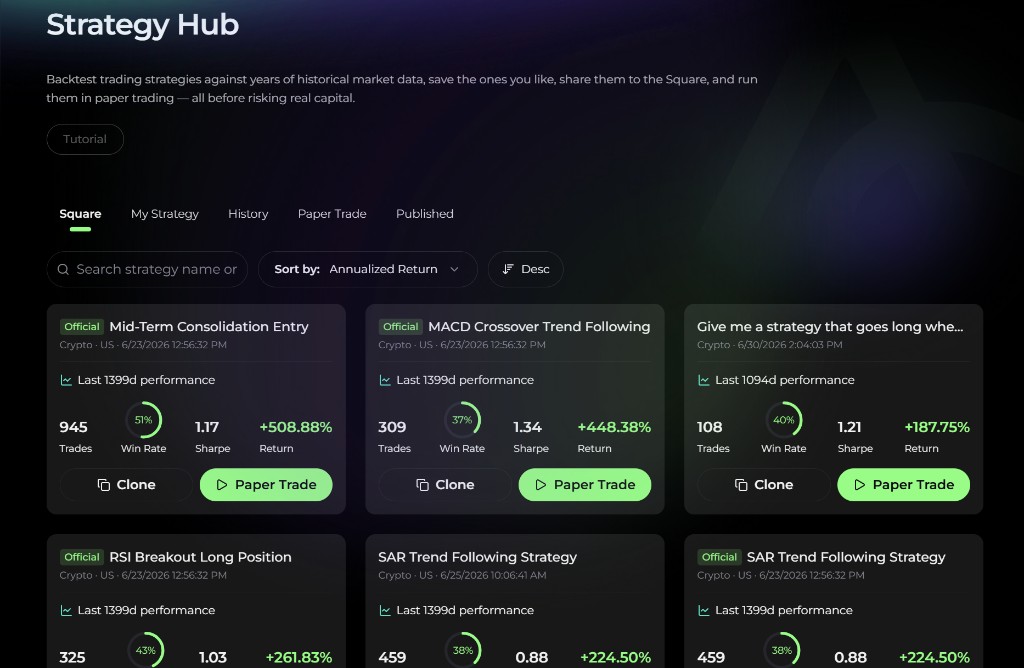
- Square — a gallery of official and community strategies you can browse, clone, paper-trade, or deploy
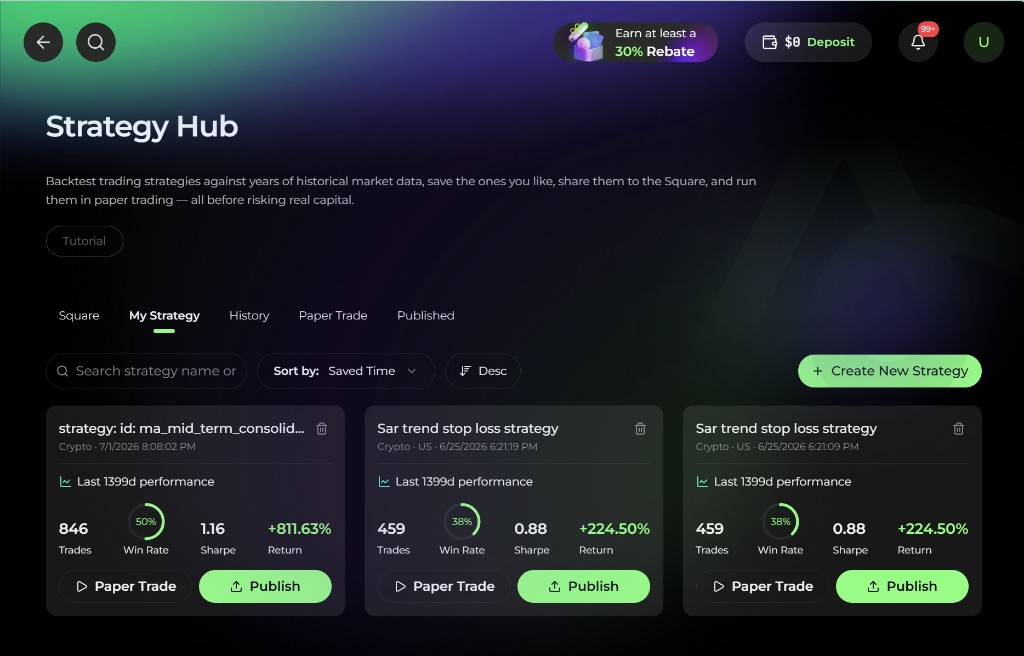
- My Strategy — strategies you created or saved after running your own backtests
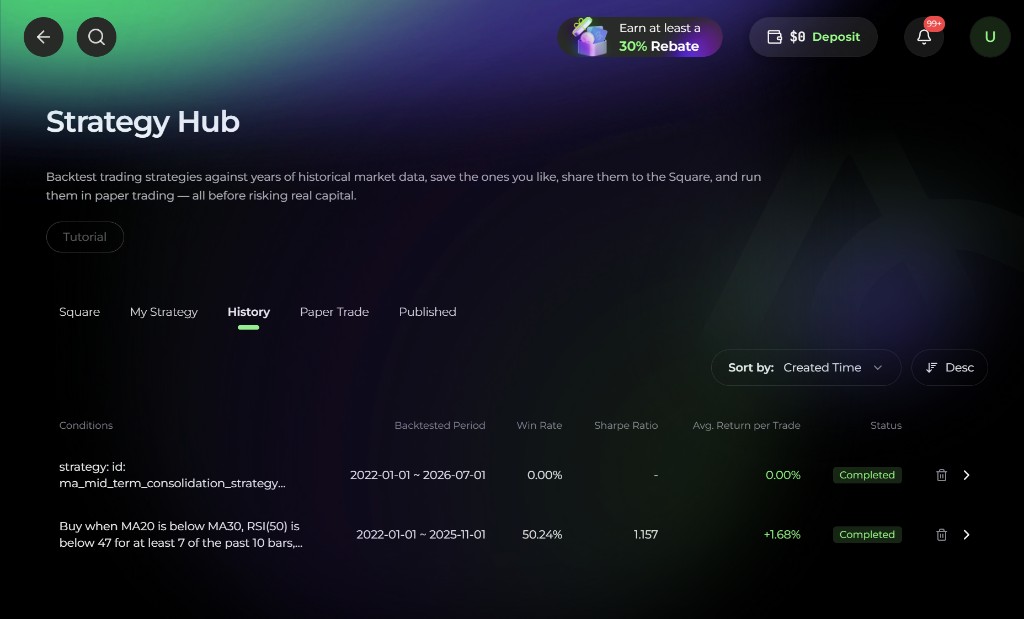
- History — completed backtest runs with summary statistics and parameter context
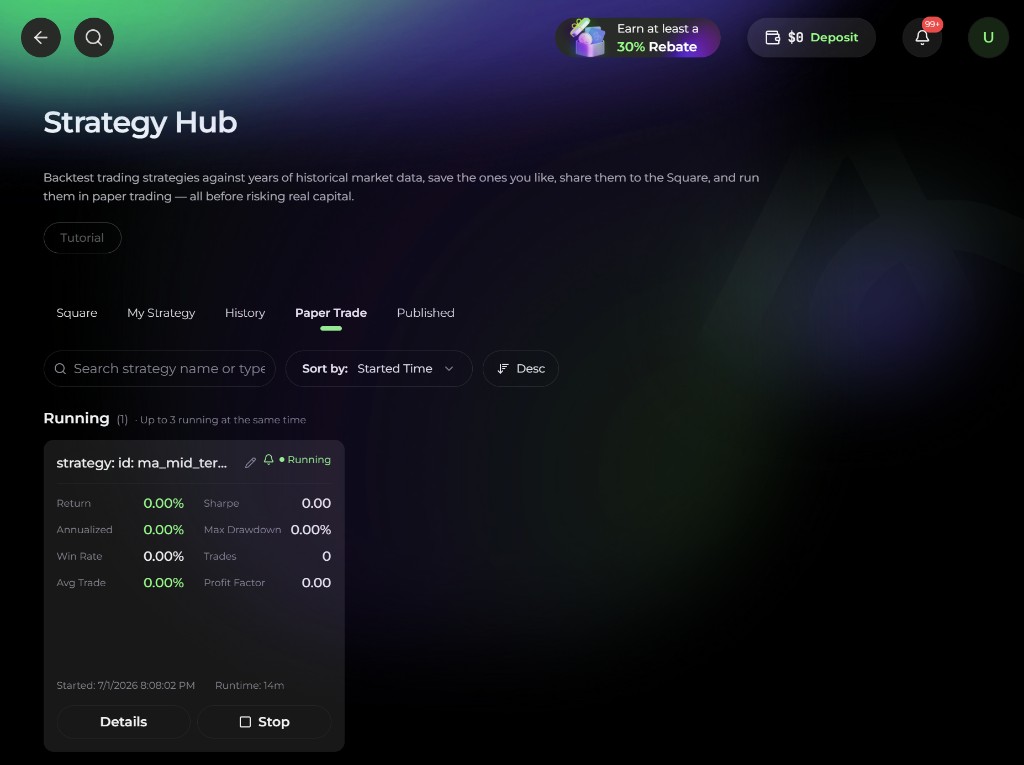
- Paper Trade — simulated strategies that keep running against live market updates
- Live — strategies you deployed to trade with real money
- Subscriptions — paid community strategies you subscribed to
- My Published — strategies you shared to the Square, with their review status and earnings
The toolbar above the list includes:
- a search box (strategy name or type)
- Sort by: Started Time, Return, Annualized Return, Sharpe Ratio, Max Drawdown, Win Rate, or Runtime — the time option is labeled Published Time, Saved Time, or Created Time depending on the tab
- an Asc / Desc toggle
3. Square: browse official and public examples
The Square tab is the fastest way to understand what a good backtest looks like. It is a gallery of shared strategies, not the community feed. For posts and public trade posts, see Square.
Each card shows:
- strategy name, with an Official badge for Alphio's own strategies
- market, asset tags (Stock / Crypto, Spot / Perp), and creation time
- price — Free or a monthly price in Credits for paid community strategies
- recent backtested performance
- Trades, Win Rate, Sharpe, Return
- actions: Clone, Paper Trade, and Deploy
Clone copies the strategy's configuration into a new strategy you can edit. Official strategies are useful starting points because they show complete, working examples of entry / exit logic, asset selection, and holding rules.
4. My Strategy: run and save your own backtests
The My Strategy tab is where your saved backtests live. From here you can review, sort, and delete strategies, start Paper Trade, and Publish a strategy to the Square.
Click Create New Strategy to start a new backtest. You describe the strategy in plain language and then define the execution model:
- backtesting period and timeframe
- When to buy — at market open or at market close
- Max Holdings — the maximum number of positions held at the same time (default 5, minimum 1). This also determines how your capital is split per position.
- Max Holding Period (Days) — the maximum holding period in calendar days (default 30); a position is force-closed once it has been held this many days. It cannot exceed the backtest period.
- Initial Fund (default 1,000,000)
- Stop Loss (%) — optional; 1 to 50 if set
- Commission (%) — 0 to 5
- trading asset, exchange / contract type where applicable, backtest universe, and buy order priority
Max Holdings and Max Holding Period (Days) are easy to confuse: the first caps how many positions you hold concurrently, the second caps how long any single position may stay open.
Supported asset types. The asset type selector offers Stock and Crypto only. Stock backtests use the US market.
The selectable universes are:
- Stock — S&P 500, NASDAQ 100, DOW 30, Watchlist, Single Ticker
- Crypto on Hyperliquid — Hyper20, Hyper50, Hyper100, All Cryptos, Watchlist, Single Ticker
- Crypto on Binance / Kucoin — Top 20, Top 50, Top 100, All Cryptos, Watchlist, Single Ticker
If you pick Single Ticker, enter the symbol you want to test.
For crypto, the exchange determines the contract type:
- Hyperliquid — perpetuals only
- Binance — spot only
- Kucoin — spot only
Timeframes and period limits. The timeframes are 1D, 1W, 4h, 2h, 1h, 30m, and 15m. The maximum backtest span depends on the asset and timeframe:
| Timeframe | Stocks | Crypto |
|---|---|---|
| 1D / 1W | up to 5 years | up to 5 years |
| 4h | up to 12 months | up to 12 months |
| 2h | up to 12 months | up to 8 months |
| 1h | up to 12 months | up to 4 months |
| 30m | up to 12 months | up to 2 months |
| 15m | up to 6 months | up to 1 month |
These caps are checked when you submit the run, so a longer period is rejected rather than silently truncated.
5. History: review completed runs
The History tab lists completed backtests with their conditions, backtested period, win rate, Sharpe ratio, average return per trade, and status. You can switch between card and list views and delete runs you no longer need.
This tab is useful when you are iterating on strategy ideas and want to compare different versions without opening each one individually first.
6. Paper Trade: continue the strategy in live simulation
The Paper Trade tab keeps a strategy running in a simulated environment using real ongoing market conditions — the bridge between "it worked historically" and "how would it behave now?"
Paper Trade lets you:
- start a simulation from a Square strategy or your own strategy
- monitor running paper strategies over time
- review return, Sharpe, annualized return, max drawdown, win rate, trades, average return, and profit factor
- open Details, Rename, or Stop a simulation
You can run up to 3 paper trades at the same time. If you try to start a fourth, Alphio tells you that you can run at most 3 at once — stop one first.
To paper-trade someone else's paid strategy, subscribe to it first.
7. Live: deploy a strategy with real money
Deploy (on a Square card or the strategy detail page) runs a strategy live in your own account:
- Stocks — orders go to a connected broker account (Robinhood, or a broker connected via SnapTrade).
- Crypto — strategies backtested on Hyperliquid (perpetuals, USDC) can be deployed. KuCoin (spot, USDT) deployment needs a KuCoin account that is already connected — new KuCoin connections are no longer offered. Strategies backtested on Binance can be paper-traded but not deployed.
A deployment is billed in Credits every hour it runs — the deploy dialog shows the rate, 20 Credits / hour. Paused and stopped deployments aren't billed. When fewer than one day's worth of Credits remain, Alphio sends a reminder to top up. If your balance can't cover the hourly fee, the deployment cancels its open orders, closes its positions and stops — keep enough Credits for as long as you want it to run. Orders it places also pay the venue's own trading fees.
Deployed strategies appear in the Live tab, where you can Pause, Resume, Stop (keep positions), Liquidate (close all), or remove a stopped deployment from the list. Deployment uses real money — review the strategy, the account, and the risk settings before you confirm.
8. Publish and subscribe
- Publish — share a strategy from My Strategy to the Square. Published strategies go through review first (In Review; a rejected one can be resubmitted). You can publish it as Free (anyone can deploy) or as a Monthly subscription priced in Credits; the buyer's price includes a 10% platform fee. My Published shows each strategy's status and its revenue since release.
- Subscribe — paid strategies in the Square are billed monthly in Credits and are non-refundable once purchased. Until you subscribe, the AI Review and Strategy Logic of a paid strategy stay locked. Your subscriptions are listed in the Subscriptions tab.
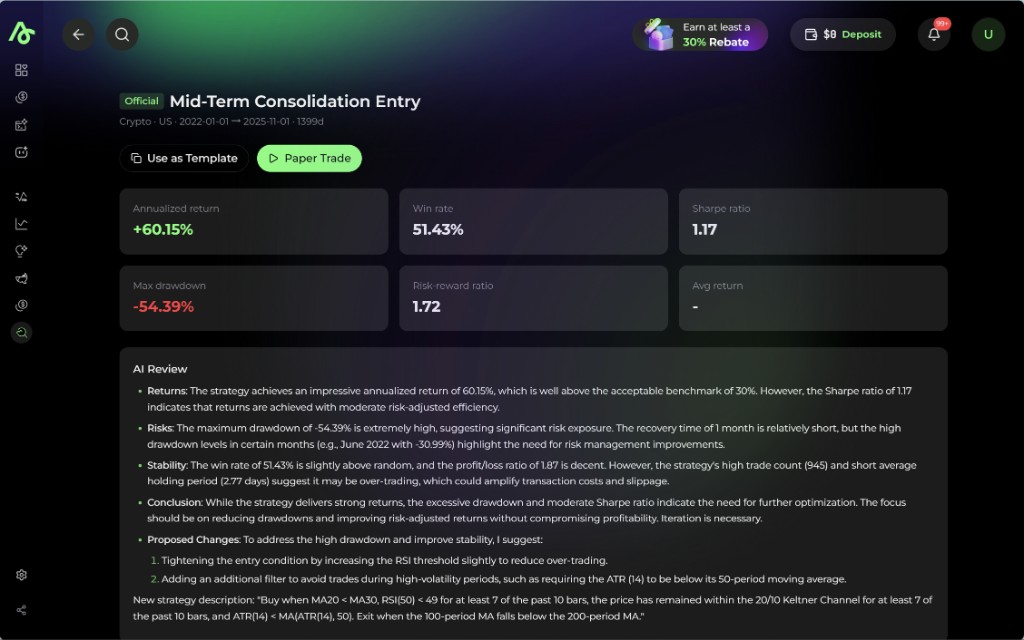
9. Strategy detail page
Whether you open a Square card or one of your own saved strategies, the strategy detail page is where the backtest becomes fully explainable.
Sections include:
- top-line metrics: annualized return, win rate, Sharpe ratio, max drawdown, risk-reward ratio, and average trade
- AI Review explaining returns, risks, stability, and possible improvements — with an option to apply the suggestions and backtest again
- comparison against a benchmark
- equity curve and drawdown chart
- P&L distribution
- monthly return breakdown (daily returns for daily-timeframe strategies)
- the full strategy logic used in the backtest
From the detail page you can also use the strategy as a template, edit and iterate, publish, paper-trade, or deploy it live.
10. How to use it well
- Start in Square to understand what strong strategies look like.
- Create or clone a strategy in My Strategy.
- Run the backtest with clear assumptions about asset universe, holding rules, and risk controls.
- Use History to compare iterations.
- Open the strategy detail page and read both the metrics and the AI Review.
- If the idea still looks promising, launch Paper Trade and monitor how it behaves under real ongoing market conditions.
- Only then consider Deploy — and start small.
Past backtest and paper-trade results do not guarantee future performance.
This page is available as plain Markdown at https://alphio.ai/docs/discover/backtesting-strategy.md. An index of every page, with a one-line summary each, is at https://alphio.ai/docs/llms.txt.